An addon is a folder of Lua files with a small manifest beside them. The game loads it after its own interface, gives it the same tools the interface uses, and calls it every frame.
The shipped interface and an addon are the same kind of thing. The bag, the chat windows and the spell bar are Lua scripts in the same sandbox, using the same functions this guide describes. So an addon is never second class: anything you see the interface do, an addon can do too.
Draw text, art, bars and windows. Read your character, your bag, your target, the creatures around you, chat and combat. Add slash commands, key bindings, dockable tabs and Info Bar slots. Save its own data.
Touch your files, reach the network, or send anything the server would not accept from a click. Every action goes through a named binding the server checks again.
A text editor and the game. No compiler, no
build step: save the file, type /reload, and see the change.
The language is Lua 5.4. If you have never written Lua, the
Programming in Lua
book's first chapters are enough: tables, functions, local, if
and for are almost everything an addon uses.
Five minutes, two files, and the game answers you in your chat log.
1. Find the addons folder
The launcher installs the game in a folder of its own. Addons go in
game/etc/addons/ inside it:
| System | The addons folder |
|---|---|
| Windows | %LOCALAPPDATA%\LegendaryMir\game\etc\addons\ |
| macOS | ~/Library/Application Support/LegendaryMir/game/etc/addons/ |
| Linux | ~/.local/share/LegendaryMir/game/etc/addons/ |
If you chose a different place when you installed, it is that folder instead. Paste the Windows path into the File Explorer address bar to open it. Addons you install with Get more addons in the game land here too, so you will see their folders beside yours. The patcher never deletes anything it did not put there.
2. Make a folder for your addon
The folder's name is your addon's id: lower case letters, digits and
underscores, 3 to 32 of them. Call this one hello_world.
3. Write the manifest
Inside it, make addon.ini:
[addon]
Title        = Hello World
Version      = 1.0.0
Description  = The smallest addon there is. Type /hello in the chat line and it answers.
Author       = Your Name
Released     = 2026-10-14
Files        = main.lua
4. Write the code
Beside it, make main.lua:
local ADDON, SHARED = ...

-- A slash command. Type /hello in the chat line.
--
-- `rest` is whatever was typed after the word: "/hello there" hands over
-- "there".
commands.register("hello", function(rest)
  local player = tlom.player()
  if player == nil then
    -- nil means "not in the world": the login or character screen.
    return
  end

  -- tlom.notice writes a line into YOUR chat log. Nobody else sees it.
  --
  -- L() takes an English sentence and named {placeholders}. It draws the
  -- sentence as written, and a translation can be added later without
  -- touching this file. Never glue a sentence together with `..`.
  tlom.notice(L("Hello, {name}! You are level {level}.",
                {name = player.name, level = player.level}))
  tlom.sound("ButtonA")
end)
5. Load it
- Start the game, or if it is already running, type
/reloadin the chat line. That rebuilds the whole interface from disk in a moment, with no relog. - Press O for Settings and open the Addons tab. Hello World is in the list, switched on.
- Type
/hello. The game says hello in your chat log.
Edit, save, /reload,
look. Every chapter after this one is more things to put in main.lua.
addon.ini says what the addon is. It is required, and its
[addon] section holds these keys:
| Key | What it does | |
|---|---|---|
| Title | required | The name players read in the Addons tab and the catalogue. |
| Version | required | Dotted numbers: 1.0.0, 1.2.10. Compared number by number, so 1.10 is newer than 1.9. Each upload to the catalogue must be higher than the last. |
| Description | required | What it does, in a sentence or three. Long is fine; the Addons tab wraps it. |
| Author | You. | |
| Released | Shown exactly as written. Nothing reads it as a date, so a typo costs nothing. | |
| Icon | A PNG inside the addon's folder, at most 128×128 pixels and 256 KB. A broken icon costs the icon, never the addon. | |
| Files | The Lua files to load, in order, separated by commas. Leave it out and every .lua in the folder loads in alphabetical order. | |
| Dependencies | Ids of addons that must load before this one. See Addons together. |
- The id is the folder name, never the title. Your saved data is kept under the id, so you can fix the title's spelling without anyone losing settings.
- A value is one line, and a
;starts a comment, so keep semicolons out of values. Lines starting with;are comments. - Missing a required key, the addon is listed in red and refused, with the key named. A folder with Lua in it but no manifest is refused the same way.
- Use
Filesas soon as you have two files. Alphabetical order putsbar.luabefore thecore.luait is built on.
Your files run once, top to bottom, when the interface loads. What they leave behind is functions, and the game calls those functions every frame.
Load order
The game's own interface loads first, then every addon (each one's dependencies before it), then the player's own scripts. A later file may replace something an earlier one made, which is how an addon can restyle a shipped panel.
The two values every file is handed
local ADDON, SHARED = ...ADDON is your id, as a string. Pass it as the owner wherever a
function asks for one, so the game can tidy up after you. SHARED is a
table every file of your addon sees: put things there that
core.lua makes and ui.lua uses.
Immediate mode: draw everything, every frame
There are no widget objects to create and keep. A window's contents are a function
that draws them, called again every frame. A button is a function call that draws a
button and answers true on the frame it was clicked:
if ui.button({x = x, y = y, width = 100, height = 18, text = "Reset", owner = w.id}) then
  count = 0
end
To change what is on screen, change your data; the next frame draws it. To hide something, stop drawing it. This is why the interface has so little code to keep in step: there is nothing to keep in step.
Where your drawing goes
| Put a function in | It draws | Use it for |
|---|---|---|
panels | under every window | Scenery: a line of text over the world, a marker. An open bag covers it. |
window.body(id, fn) | inside a window | Anything a player opens, drags, resizes and closes. See Windows. |
panes.register{...} | in a tab of the chat windows | Something a player docks beside their chat. See Tabs. |
overlays | over every window | Warnings, and things in flight that must not vanish behind a window. |
panels[#panels + 1] = function()
  -- called once a frame, under the windows
end

overlays[#overlays + 1] = function()
  -- called once a frame, over everything
end
Polling, and events
Almost everything is read by asking, every frame you need it:
tlom.player().health is the health right now. That is the right shape for
drawing. It is the wrong shape for things that happen, like a kill or a heal, because
three of them can land between two frames. Those arrive as events.
An addon runs in a sandbox that protects the player's computer and the game. It is an allow-list: what is not listed here does not exist.
The basics (pairs, ipairs,
type, tostring, tonumber, pcall,
select, error...), string, table,
math, utf8, coroutine, and the game's own
libraries.
io, os,
package, require, load, loadfile,
dofile, debug, collectgarbage,
setmetatable, getmetatable, the raw* functions,
and print.
What that means for your code
- No metatables. Object-oriented Lua written with
setmetatablewill not run. Put functions on the table itself:function db.get(self, key) ... end, or plain functions that take the table. - No
require. Split code across files with the manifest'sFileslist, and share between them throughSHARED. - No
print. Usetlom.notice(text)to write a line in your own chat log, ortlom.log(text)for the client's log file (see When it goes wrong). - No files.
savedis the whole of what an addon may keep. - A time limit. One call into your code may run for 100 milliseconds
before it is stopped with an error. A
while true do endcosts you that function, not the player's game.
All addons run in one interpreter
with one set of globals. Name anything global after your addon, or better, keep
everything local. This is to stop collisions, and it is not a security
wall: the wall is around all addons together.
Everything is drawn through art, sized by
theme, and placed with screen.
Coordinates and colours
Positions are interface pixels from the top left of the game window. Colours are
tables of four numbers from 0 to 1: {r, g, b, a}. Use the interface's own
colours so your addon looks like it belongs:
theme.fade(colour, alpha) gives a see-through copy. Never change a theme
colour's table in place: it is shared, and you would recolour the whole interface.
The drawing calls
| Call | Draws |
|---|---|
art.text(x, y, text, colour) | Text in the interface's font. |
art.outlined(x, y, text, colour) | Text with a dark outline: readable over the world. |
art.label(x, y, text, colour) | Outlined text drawn once and reused. Use it for text that rarely changes and is drawn many times, such as names over heads. |
art.centred(x, y, width, text, colour) / art.right(...) | Text centred in, or against the right of, a width. |
art.rect(x, y, w, h, colour) | A filled rectangle. |
art.flat_bar(x, y, w, h, fraction, fill, back) | A bar filled from the left. |
art.draw(library, index, x, y) | A picture out of the game's art. |
theme.line() / theme.measure(text) | The height of a line of text, and the width of some text. |
Nothing stops text running out of
a box. A list must stop drawing rows when it reaches the bottom, which is what
ui.list does for you.
Example: Where Am I
A loose panel that writes the map and your coordinates along the top of the screen, with a tooltip when you point at it.
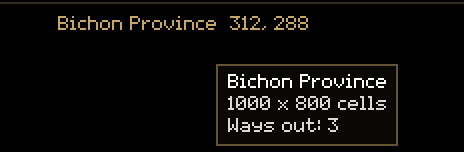
panels[#panels + 1] = function()
  -- "game" once a character is in the world, "login" before. Nothing to say
  -- on the login screen.
  if window.scene ~= "game" then return end

  local map = tlom.map()
  local player = tlom.player()
  if map == nil or player == nil then return end

  local text = L("{map}  {x}, {y}", {
    -- A map's name is translated for you. ui.readable tidies an id into
    -- words for the rare map that has no name.
    map = ui.readable(map.name ~= "" and map.name or map.id),
    x = player.x, y = player.y,
  })

  -- screen.* is the part of the screen nobody else has reserved. A bar
  -- another addon puts along the top moves this down by itself.
  local width = theme.measure(text)
  local x = screen.left() + math.floor((screen.width() - width) / 2)
  local y = screen.top() + 6

  -- Outlined, because it is drawn straight over the world, and pale text on
  -- a picture is only readable by luck.
  art.outlined(x, y, text, theme.primary)

  -- mouse.over says whether the pointer is on this rectangle. Its last
  -- argument is the window it belongs to - nil, for a loose panel.
  if mouse.over(x, y, width, theme.line(), nil) then
    -- A tooltip is a list of {text, colour} lines.
    tooltip.show({
      {ui.readable(map.name ~= "" and map.name or map.id), theme.white},
      {L("{width} x {height} cells", {width = map.width, height = map.height}), theme.text},
      {L("Ways out: {count}", {count = #(map.portals or {})}), theme.text},
    })
  end
endThe tlom table answers questions about the game as it is
this frame. Each call returns a fresh table; read what you need and let it go.
| Call | Returns |
|---|---|
tlom.player() | Your character, or nil outside the world: id, name, level, x, y, health, max_health, mana, max_mana, experience, experience_needed, dead, direction, map, and offset_x, offset_y, walking for where the character is drawn mid-step, and in_safe_zone once the server has said whether you are in a town. |
tlom.stats() | Your full stats: gold, class, level, min_damage, max_damage, min_mc, max_mc, min_sc, max_sc, min_armour, max_armour, accuracy, agility, luck, critical_chance, bag_weight, max_bag_weight and more. nil until they arrive. |
tlom.map() | The map you are on: id, name, width, height, portals (a list of {x, y}), and light: one of map_light.default, .light, .night, .twilight - only default follows the time of day. |
tlom.nearby() | Everything in view except you: rows of id, name, kind, x, y, health, max_health, dead, owner, screen_x, screen_y. kind is 1 player, 2 monster, 3 NPC, 4 item on the ground. A creature's presentation is how it is drawn ("Mon-3:3"), empty for a player. The Bestiary uses it to show the creature in a window. |
tlom.target() / tlom.hover() | What you have targeted, and what is under the pointer: id, name, kind, level, health, max_health, dead, x, y, owner, or nil. |
tlom.items() | Your bag and what you wear: rows of id, item, name, count, slot, equipped, durability, max_durability, sell_value and more. |
tlom.buffs() | Your buffs: rows of type, icon, magic, ends_in (milliseconds), charges, paused. |
tlom.allies() | Your group and guild on this map at any range: id, name, x, y, group, guild. |
tlom.speech(ms) | What people on screen said aloud in the last ms milliseconds. |
tlom.chat(since) | Chat lines after sequence number since. |
tlom.combat_log(since) | Combat events after since. Most addons use the events instead. |
tlom.now() | Milliseconds since the client started. Never jumps: use it for animation and timing. |
tlom.clock() | The local wall clock: hour, minute, second, year, month, day, unix. |
tlom.width() / tlom.height() | The game window in interface pixels. |
tlom.world_cells() | Where map cell (0, 0) is drawn and how big a cell is: x, y, width, height. |
tlom.connection() | Whether the game is connected: state is "in_world", "reconnecting" and so on. |
tlom.frame() | fps, frame_ms, draws, batches. |
On the login screen there is no player,
no map and no stats, and during a map change there is briefly no map.
if player == nil then return end at the top of a function is normal.
Doing things
A handful of bindings act, and each is a request the server checks:
tlom.notice(text) (a line in your own chat log), tlom.sound(name),
tlom.say(channel, target, text), tlom.use_item(id),
tlom.clear_target(). The client allows one item action every 120
milliseconds, so a loop of item actions in one frame loses all but the first.
Sound names include ButtonA, ButtonB, ButtonC,
GoldPickUp, QuestTake, QuestComplete and
TeleportIn. An unknown name plays nothing rather than failing.
An event is something that happened. You subscribe to it by name, and your function is called once for every time it happens, just before the frame draws.
local handle = events.on("PLAYER_LEVEL_UP", function(event)
  tlom.notice(L("Level {level}!", {level = event.level}))
end, ADDON)

events.off(handle)          -- stop one
events.off_all(ADDON)       -- stop everything this addon subscribed to
events.emit("MY_ADDON_THING", {value = 1}) -- publish your own| Event | When | Carries |
|---|---|---|
| COMBAT_DAMAGE | a blow took health off | the combat row (below) |
| COMBAT_MISS | a blow did nothing | kind is "miss" or "blocked" |
| COMBAT_HEAL | health went back up | the combat row |
| COMBAT_DEATH | something died | source is the killer |
| COMBAT_EVENT | any of the four above | the combat row |
| COMBAT_ENTERED / COMBAT_LEFT | a fight began / went quiet | |
| PLAYER_ENTERED_WORLD / PLAYER_LEFT_WORLD | in or out of the world | |
| PLAYER_LEVEL_UP | your level changed | level, was |
| PLAYER_XP | experience changed | experience, gained, needed |
| PLAYER_GOLD | your gold changed | gold, change |
| PLAYER_DIED / PLAYER_REVIVED | ||
| PLAYER_MAP_CHANGED | you changed map | map, was |
| PLAYER_MOVED | you took a step | x, y, from_x, from_y |
| SAFE_ZONE_CHANGED | you walked into or out of a town | in_safe_zone |
| TARGET_CHANGED | target, was | |
| INVENTORY_CHANGED | the bag's contents changed | count |
| BUFF_GAINED / BUFF_LOST | buff / type | |
| CHAT_MESSAGE | a chat line arrived | the chat row: speaker, text, channel... |
| CONNECTION_LOST / WORLD_RECONNECTED | the connection dropped / came back | after a reconnect, throw away anything you copied from the old world |
The combat row
| Field | Meaning |
|---|---|
| source, target | Object ids: who did it, and who it happened to. |
| source_name, target_name | Their names at the time, so a row still makes sense after they have gone. |
| amount | What landed. |
| overkill | Damage past zero, or a heal's overhealing. |
| critical | true for a critical. |
| magic | The spell, or 0 for an ordinary swing. |
| mine | true when you did it. |
| on_me | true when it happened to you. |
| at_ms | When, on the tlom.now() clock. |
If your function raises an error, it is removed rather than retried sixty times a second. Your other handlers keep running.
A window is defined once and drawn every frame it is open. The game gives it a frame, a title, dragging, resizing, a close button, Escape to close, and a remembered position.
window.define({
  id = "my_window",          -- unique: prefix it with your addon's id
  title = "My Window",
  width = 260, height = 240,
  resizable = true, min_width = 200, min_height = 140,
  key = "my_addon.toggle",   -- a key binding that opens and closes it
  place = function(w, screen_w, screen_h)   -- where it goes the FIRST time
    w.x, w.y = 40, 120
  end,
})

window.body("my_window", function(w)
  local x, y, width, height = window.inner(w)   -- the room inside the frame
  -- draw here
end)

window.toggle("my_window")   -- also window.open, window.close
The owner rule: pass w.id as the owner of every
button, list and field you draw in a window. Then a click lands only on the window at
the top, never on one underneath it.
Widgets
| Call | Answers |
|---|---|
ui.button{x, y, width, height, text, owner, style, enabled, tip} | true on the frame it is clicked. style is "small" (the default), "tab", "tab_selected" or "none". |
ui.checkbox{x, y, checked, text, owner} | true on the frame it is clicked. Flip your value yourself. |
ui.slider{id, x, y, width, value, min, max, owner} | The value after whatever the pointer did this frame. Whole numbers. |
ui.list(w, {x, y, width, height, rows, empty, scroll}) | The index of the row clicked, or nil. A row is {text, right, colour, selected}. |
ui.textbox{x, y, width, height, text, focused, placeholder, owner, limit} | Three values: the text, whether Enter was pressed, and whether it was clicked. |
ui.bar{x, y, width, height, value, maximum, text, fill, framed} | Draws a bar. |
tooltip.show(lines) | A tooltip at the pointer this frame. lines is a list of {text, colour}. |
menu.open(x, y, rows, owner) | A right-click style menu. A row is {text = "...", action = function() end}; add enabled = false to dim one. |
Helpers for text: ui.commas(12210) gives 12,210,
ui.duration(seconds) a readable time, ui.readable(id) tidies an id into
words, and ui.elide(text, width) cuts text to fit with an ellipsis.
Example: Kill Tally
Counts what you kill, by name, for this session and for all time. It uses an event, saved data, a window, a key binding and a slash command: everything a full addon is made of.
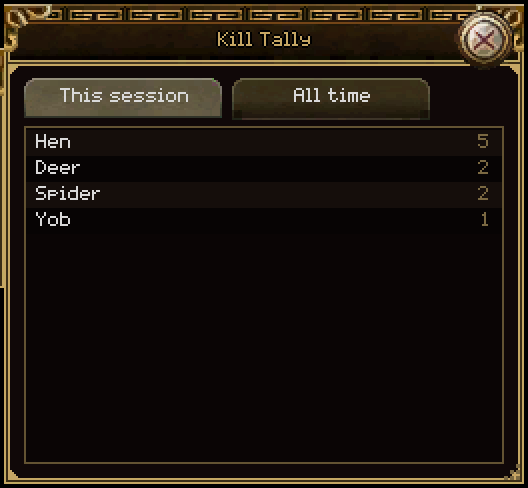
The event handler counts only monsters you killed. Whether the dead thing was a
monster is a fact about the creature, so it looks the body up in
tlom.nearby(), where it lies for a moment after it dies:
events.on("COMBAT_DEATH", function(event)
  -- `mine` is true when this player landed the killing blow.
  if not event.mine then return end

  -- Only monsters. The event says who died; whether it was a monster is a
  -- fact about the creature, and the body is still in tlom.nearby() when the
  -- event arrives.
  local kind = nil
  for _, object in ipairs(tlom.nearby()) do
    if object.id == event.target then kind = object.kind; break end
  end
  if kind ~= kKindMonster then return end

  local name = event.target_name or "?"
  session[name] = (session[name] or 0) + 1
  all_time[name] = (all_time[name] or 0) + 1
  save()
end, ADDON)   -- the owner: events.off_all(ADDON) would remove every handler
The window's body draws two tab-styled buttons and a list. Nothing is kept between
frames except showing; the rows are rebuilt from the counts every frame:
window.body("kill_tally", function(w)
  local x, y, width, height = window.inner(w)
  local button_h = 18

  -- Two buttons along the top choose what the list shows.
  if ui.button({x = x, y = y, width = 100, height = button_h,
                style = showing == "session" and "tab_selected" or "tab",
                text = L("This session"), owner = w.id}) then
    showing = "session"
  end
  if ui.button({x = x + 104, y = y, width = 100, height = button_h,
                style = showing == "all_time" and "tab_selected" or "tab",
                text = L("All time"), owner = w.id}) then
    showing = "all_time"
  end
  y = y + button_h + 6
  height = height - button_h - 6

  local counts = showing == "session" and session or all_time
  ui.list(w, {x = x, y = y, width = width, height = height,
              rows = rows_of(counts), empty = L("Nothing killed yet.")})
end)Text fields and the keyboard
Only one field has the keyboard at a time, and while it does, keys type instead of walking or opening windows. You take the keyboard when your field is clicked:
local typed, entered, clicked = ui.textbox({
  x = x, y = y, width = 200, height = 18, owner = w.id,
  text = draft, focused = focus.has("my_addon.field"), limit = 120,
})
if clicked then
  focus.take("my_addon.field")
  focus.claimed = true      -- this click was a field's: do not drop the keyboard
end
draft = typed
if entered then ... end
Clicking anywhere else gives the keyboard back to the game by itself.
Each addon has a store of its own that survives logging out, quitting, and updating the addon.
local db = saved.open(ADDON)

db:set("settings", {percent = 30, sound = true})
local settings = db:get("settings", {})   -- the fallback, when nothing is saved
local names = db:keys()- What it keeps:
nil, booleans, numbers, strings, and tables of those, nested. Functions are quietly left out. - When it writes: a moment after your last change, and when the game
closes. Calling
db:setoften is fine; it is not a disk write each time. - Limits: keys up to 64 characters, 256 keys and 1 MB per addon. Big values are split for you.
- Where: one file per addon in
game/etc/addon-data/, outside the addon's folder, so replacing or updating the addon keeps the settings.
The file is the player's, and they can edit it. Check the type of what comes back before you use it, and fill in defaults for anything missing:
local settings = db and db:get("settings", {}) or {}
if type(settings) ~= "table" then settings = {} end
if type(settings.percent) ~= "number" then settings.percent = 30 end
if type(settings.sound) ~= "boolean" then settings.sound = true endSlash commands
commands.register("kills", function(rest)
  -- "/kills reset" hands over "reset"
end)

commands.run("kills reset")   -- run one yourself
The first addon to claim a word keeps it. A word nobody claims goes to the server as
before. A handler can return false to decline, and the line goes on to the
server.
Key bindings
keys.add({action = "kill_tally.toggle", key = "k", control = true, shift = true,
          label = "Kill Tally"})
That puts a binding in the game's own key map. It appears on the Controls page of
Settings under its label, where the player can change it, and their choice
is remembered. Give a window key = "kill_tally.toggle" and it opens and
closes itself; or ask yourself, once a frame, with
keys.pressed("kill_tally.toggle"). A binding never fires while someone is
typing.
Timers
local h = timer.after(2.0, function() ... end, ADDON)   -- once, in two seconds
local h = timer.every(5.0, function() ... end, ADDON)   -- every five seconds
timer.cancel(h)
timer.cancel_all(ADDON)
Accurate to a frame. A repeating timer that falls behind runs once and starts again from now, rather than firing once for each time it missed.
When a player picks your addon in the Addons tab, it shows your
addon's page. Register a panel function and draw your settings
there.
addons.register({
  id = ADDON,
  name = "Health Alarm",
  summary = "Red screen edges when health is low.",
  panel = function(w, x, y, width, height)
    -- w is the settings window: pass w.id as the owner
  end,
})
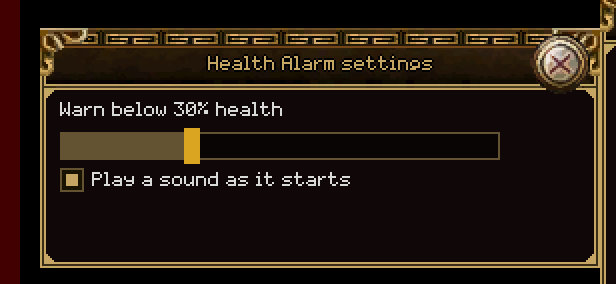
Example: Health Alarm
An overlay that pulses the edges of the screen red when health falls below a line, with a slider for the line and a tick box for the sound.
overlays[#overlays + 1] = function()
  if window.scene ~= "game" then return end
  local player = tlom.player()
  if player == nil or player.dead or (player.max_health or 0) <= 0 then return end

  local percent = player.health * 100 / player.max_health
  if percent >= settings.percent then
    armed = true
    return
  end

  if armed and settings.sound then tlom.sound("ButtonC") end
  armed = false

  -- A pulse once a second: tlom.now() counts milliseconds since the client
  -- started, and never jumps.
  local phase = (tlom.now() % 1000) / 1000
  local alpha = 0.2 + 0.4 * math.abs(math.sin(phase * math.pi))
  local colour = theme.fade(theme.red, alpha)
The settings page saves only when a value actually changes:
    local percent = ui.slider({id = "health_alarm.percent", x = x, y = y + line + 6,
                               width = math.min(220, width), value = settings.percent,
                               min = 5, max = 90, owner = w.id})
    if percent ~= settings.percent then
      settings.percent = percent
      save()
endThe chat windows are a docking system: tabs a player drags between windows, tears out into windows of their own, and arranges once. A pane is a kind of tab your addon adds to it.
You write a draw function and a name. The window, the tab strip, the
dragging and the saved arrangement are done for you.
| Field | What it is |
|---|---|
| id | The kind of tab. Saved in the player's arrangement, so never rename it. |
| name, summary | The tab's name, and a line describing it. |
| draw(tab, x, y, width, height, window) | The inside of the tab, every frame. Pass window.id as the owner. |
| width, height, min_width, min_height | The size of a window made for one. |
| place(screen_w, screen_h, w, h) | Returns x, y for the first window made. |
| menu(tab, window) | Extra rows for the tab's right-click menu. |
| variants | A list of {key, name}: the same kind of tab set up different ways, each a row of its own in the New tab menu. |
| start(tab, variant) | Sets up a new tab. The only time a tab learns which variant it is. |
| save(tab) / load(tab, text) | A short string (no |, at most 48 characters) kept in the arrangement, so a tab comes back as it was. |
| default_open | Put one in a new player's arrangement. |
panes.open(id, variant) makes a tab in a window of its own, and
panes.toggle(id) is what a key or a command usually wants.
A player may open two of your
tabs. Anything that differs between them belongs on the tab table, under
your addon's name, never in a variable they would share.
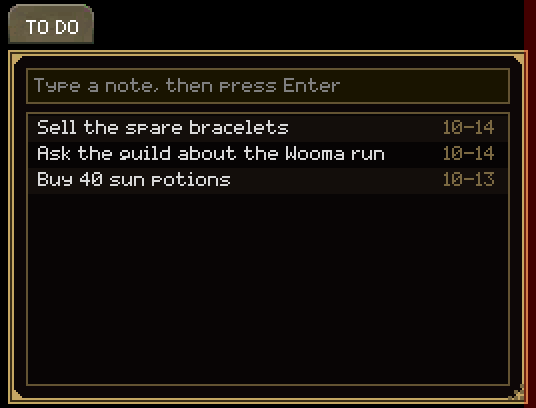
Example: Notepad
Notes in a chat tab, in two kinds: Notes and To do, each its own list. Type, press Enter, and the note is saved.
local function state(tab)
  local it = tab.notepad
  if it == nil then
    it = {list = "notes", draft = "", selected = nil}
    tab.notepad = it
  end
  return it
end
variants = kLists,
start = function(tab, variant)
if variant and known(variant) then state(tab).list = variant end
end,
-- What a tab must remember to come back the same: which list it shows.
-- Short, and never a "|".
save = function(tab) return state(tab).list end,
load = function(tab, text)
-- From a file the player can edit: check it before using it.
if known(text) then state(tab).list = text end
end,An addon can publish functions for others to use, and another can build on it.
-- In the addon that offers something:
addons.api("kill_tally", {
  session = function() return session end,
})

-- In an addon that uses it:
local tally = addons.use("kill_tally")   -- nil when it is missing or switched off
if tally then ... end
To build on another addon, name it under Dependencies in your manifest.
It then loads before yours, and if the player switches it off, yours is switched off too
with the reason shown. Without the line, load order is alphabetical, and an addon
called gold_rate would load before info_bar and find nothing.
Even with the dependency, check that addons.use found it: a dependency
that failed to load is still missing. Say so and stop, rather than raising on the
next line.
Example: Gold Rate, a slot on the Info Bar
Info Bar (in the catalogue) is a bar along the top of the screen that other addons add slots to. Gold Rate adds one showing the gold you have picked up in the last ten minutes, as gold per hour. It owns no window and draws nothing itself.

Dependencies = info_barlocal info_bar = addons.use("info_bar")
-- addons.use answers nil rather than raising, because the ordinary reason is a
-- player switching Info Bar off. Say so, and stop.
if info_bar == nil then
addons.register({
id = ADDON,
name = "Gold Rate",
summary = "Needs the Info Bar addon, and it is not running.",
})
return
endA slot is a table of functions: its text, its colour, its tooltip, and what a click does:
info_bar.slot({
  id = "gold_rate",
  name = "Gold per hour",
  side = "right",
  text = function()
    return L("{gold}/h", {gold = ui.commas(per_hour())})
  end,
  colour = function() return theme.goldenrod end,
A new slot starts switched off, because the bar is the player's. Gold Rate puts itself on the bar the first time it runs, and never again after a player hides it.
A bar along an edge of the screen would cover whatever is there. Reserve the strip instead, and everything else moves out of its way.
screen.reserve(ADDON, "top", 24)          -- "top", "bottom", "left" or "right"
local x, y, w, h = screen.strip(ADDON)    -- your strip: draw your bar here
local x, y, w, h = screen.rect()          -- what is left for everyone else
screen.release(ADDON)
The bottom panel, the chat, the minimap, the buffs and every window's placement ask
screen where the edges are, so one reservation moves all of them. Two bars
on one edge stack. Always draw in screen.strip(ADDON), never at an
offset you worked out yourself, or two bars land on top of each other. A request for
more than half the screen is refused.
Drawing over the world? Place it with screen.left(),
screen.top(), screen.width() and friends, rather than
0 and tlom.width(), and other players' bars will never cover
it.
Your own windows and panels are yours to draw in. Three hooks let you add to what the game's interface draws, without replacing any of it.
A mark on every item cell
items.decorate(ADDON, fn) calls fn(cell) for every item cell
the interface draws: the bag, storage, shops, trade, mail, the belt and the character
sheet. What you draw goes over the item's picture and under its count and border.
items.decorate(ADDON, function(cell)
  -- cell = {item, x, y, width, height, window, ghost}; item is nil for an empty cell.
  local item = cell.item
  if item == nil or marked[item.id] == nil then return end
  art.circle(cell.x + 7, cell.y + cell.height - 7, 5, theme.goldenrod)
end)

items.undecorate(ADDON)   -- stop
cell is one table refilled for every cell, so copy anything you want to
keep. It is only for drawing: the pointer belongs to the cell. It runs for about eighty
cells a frame with a bag and a shop open, so look the item up and return early. A
function that raises is dropped, with a line in the log. Junk Seller
in the catalogue puts a coin on junk this way.
A control inside another window
Some of the game's windows offer slots: places where an addon's control is
drawn as part of the window, moving, folding and closing with it.
window.slots(id) lists a window's slots. The bag is the first to offer one:
window.slots("inventory") gives {top = "Above the grid"}.
if window.inject and window.slots("inventory").top then
  window.inject({
    id = "my_addon.field", window = "inventory", slot = "top",
    height = 22,                       -- or function(w) ... end; 0 hides it
    draw = function(w, x, y, width, height)
      -- Ordinary drawing inside the bag. Controls with owner = w.id take
      -- the pointer as the bag's own do.
      text = ui.textbox({x = x, y = y, width = width, height = height,
                         text = text, owner = w.id})
    end,
  })
end

window.uninject("my_addon.field")   -- take it out again
The window grows by what its slots hold. A control may be at most 64 pixels high, and a
slot holds at most four. One that raises is dropped. Bag Search puts its
search field in the bag this way. Your own windows can offer slots too:
window.define{slots = {name = label}}, then lay out
window.slot_height(w, name) lower and call
window.draw_slot(w, name, x, y, width) where the slot goes.
Boxes beside an item's tooltip
tooltip.beside(fn) adds boxes beside the tooltip being shown.
fn(lines) receives that tooltip's lines (an item's has
lines.item, the item) and returns a list of line lists, or
nil. Each list is drawn as a box of its own beside the tooltip, three at
most. Compare shows what you are wearing this way.
These are newer than some players'
clients. if items.decorate then ... end and
if window.inject then ... end keep your addon working on an older one, as
Junk Seller and Bag Search do.
The game is played in nine languages. Write your addon's words so they can follow.
Pass every sentence a player reads through L(), with the changing parts
as named placeholders:
art.text(x, y, L("{count} kills recorded.", {count = total}), theme.text)An English sentence is its own key: it needs no table entry and draws exactly as written. A translation can be added later without touching your code.
.."You have " .. n .. " left"
is three pieces in English's word order, and no other language uses that order.
Write one sentence with a {placeholder} and let each language put it where
it belongs.
A key made only of lower-case letters, digits, dots and underscores, like
ui.common.search, is an identifier rather than a sentence. It is drawn in
[brackets] unless the game's tables have it, so use the interface's own keys only when
you know they exist.
Your functions run sixty or more times a second, alongside every other addon. A little care keeps the game smooth.
- Work once, not every frame. Sort a list when it changes, not each
time you draw it. Work out a rate on a
timer.every, not indraw. - Ask once per frame.
tlom.items()andtlom.nearby()build a new table each call. Call once and keep the result for the rest of that frame. - Make less garbage. A new table per row per frame adds up. Reuse tables where it is easy.
- Bake repeated text. Many labels drawn each frame are cheaper with
art.label, which draws a label once and reuses it. - Keep saved data small. Trim logs to the last hundred entries; a list that grows forever is a file that grows forever.
The Resource Monitor addon in the catalogue shows how much memory each addon holds and how fast it makes garbage, so you can see your own addon's cost.
A mistake in an addon costs that addon, never the game.
| What happened | What you see |
|---|---|
| A file has a syntax error, or raises while loading | The addon's row in the Addons tab (O, then Addons) is red and says it did not load, with the file and line. |
| A panel, window or pane raises while drawing | That one function is taken out and stops drawing; everything else carries on. The error goes to the client log. |
| An event handler or timer raises | It is unsubscribed. The error goes to the client log. |
| Your settings page raises | The page says so instead of drawing. |
| A missing manifest key, or a dependency that is missing or off | The red row names the reason. |
Seeing what your code is doing
tlom.notice("...")writes a line in your own chat log. Quick, and you see it at once.tlom.log("...")writes to the client's log file, beside the game:LegendaryMir/logs/client-<date>-<time>.log. Lines from Lua start withui:, and errors from addons are there too.- After a fix,
/reload. A function taken out after an error comes back with a reload.
The mistakes everyone makes once
- Indexing nil on the login screen.
tlom.player(),tlom.map()andtlom.stats()are nil there. Check first. - A button that does nothing. You forgot
owner = w.id, or drew it outside the window. - A setting that resets every session. You saved the value, but loaded under a different key, or never loaded it at all.
- Typing walks the character. The field never took the keyboard:
call
focus.takewhen it is clicked. - Two of something after
/reload. Everything is rebuilt from nothing on a reload, so this means your code added it twice in one load.
Share your addon on the addon catalogue, where players find it on this site and in the game through Get more addons.
- Zip the folder. The zip holds your addon's folder, named with its
id, with
addon.iniinside it. - Sign in and submit it on the submit page, with a one-line summary, a description, tags, an icon and up to five screenshots.
- An admin reads it. Every addon is checked before it is listed. You can follow it on My addons.
- Players install it from the catalogue in the game: Settings, then Addons, then Get more addons.
- To update, raise
Versionand upload the new zip. Players see an Update mark. Their saved settings are kept.
What the zip may hold
- Only
.lua,.ini,.png,.txtand.mdfiles, at most 256 of them. - At most 2 MB zipped and 8 MB unzipped.
- No two names that differ only in capital letters. Use lower case for everything: the game runs on Linux and macOS too, where case matters.
- Every Lua file must at least read cleanly. Test with
/reloadbefore you upload. - An id may not be
ui,tlom,interface,coreoraddons.
Every example on this page passes these rules exactly as you download it.
Some things the game does not tell the interface, so no addon can show them. They are listed so you do not spend an evening looking.
| Wanted | Why not |
|---|---|
| Your ping | Nothing measures a round trip to the server. |
| The in-game hour | The world has a light level and four phases (night, dawn, day, dusk), not hours. |
| Other players' spell names | tlom.magic() is your own spell book. Others' spells arrive as a number. |
| Reading or writing files | Never. saved is all there is. |
| Sending your own messages to the server | No. An addon acts only through bindings, and each is an action the server checks. |
| Drawing outside a box | Possible, which is the problem: there is no clipping, so bound your own rows. |
Each example is a complete addon, commented line by line. Unzip one into
your addons folder, /reload, and read it beside the game.
The zip holds six folders: unzip it straight into your addons folder. Hello World is the best starting point for an addon of your own. Copy its folder, rename it, and change the id-shaped names inside.
| Library | Calls |
|---|---|
| addons | register{id, name, summary, panel}, api(name, table), use(name) |
| art | text, outlined, label, centred, right, rect, flat_bar, draw |
| commands | register(word, fn), run(line) |
| events | on(name, fn, owner), off(handle), off_all(owner), emit(name, table) |
| focus | take(name), has(name), release(name), claimed |
| keys | add{action, key, control, shift, alt, label}, pressed(action), remove(action) |
| menu | open(x, y, rows, owner), close(), is_open() |
| mouse | over(x, y, w, h, owner), clicked_on(...), right_clicked_on(...), x, y |
| panes | register{...}, open(id, variant), toggle(id), tabs(id) |
| saved | open(id) → db:get(key, fallback), db:set(key, value), db:keys() |
| screen | reserve(id, edge, size), release(id), strip(id), rect(), left() top() right() bottom() width() height() |
| theme | colours (primary, text, white, grey, red, lime...), fade(colour, alpha), line(), measure(text) |
| timer | after(seconds, fn, owner), every(seconds, fn, owner), cancel(h), cancel_all(owner) |
| items | decorate(owner, fn), undecorate(owner) |
| tooltip | show(lines), beside(fn) |
| ui | button, checkbox, slider, list, textbox, bar, commas, duration, readable, elide |
| window | define{...}, body(id, fn), inner(w), open(id), close(id), toggle(id), get(id), scene, inject{...}, uninject(id), slots(id) |
| tlom | player, stats, map, nearby, target, hover, items, buffs, allies, chat, speech, now, clock, width, height, notice, log, sound |
| globals | panels, overlays, L(text, params) |
The game's own interface and the addons in the catalogue are the best further reading: they use these same calls, and every one of them is commented.