A guild can buy an island out of its purse. Each one is made new for the guild that buys it, so no two are alike, and it belongs to the guild until the guild sells it or gives it up. Only members of the guild that owns it can sail there.
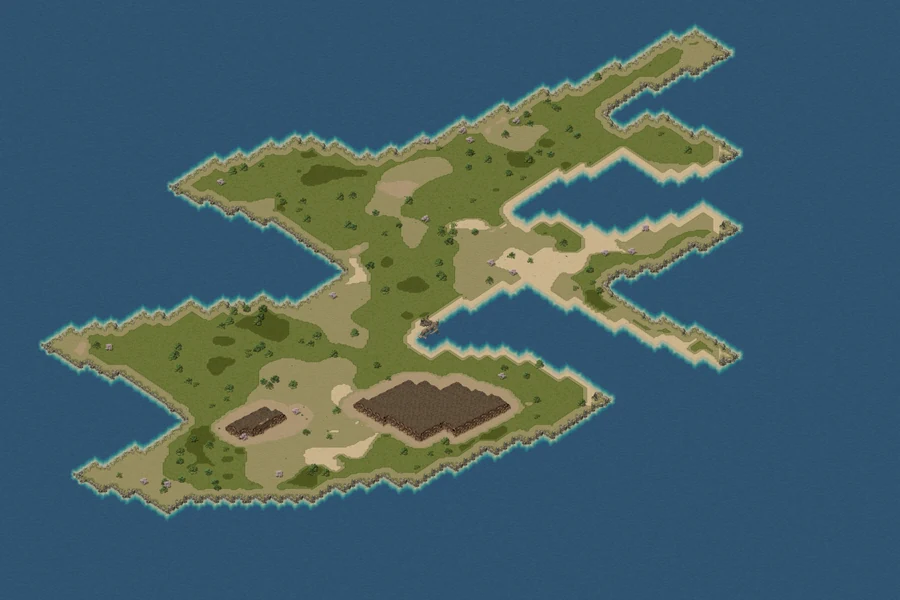
What you get
- Land. Most islands are 900 cells each way: grass, sand and earth, with cliffs and beaches round the coast, headlands, inlets and arms of land reaching into the sea.
- One dock. It is where you arrive. It is part of the island and can't be moved or built over.
- Scenery. Trees, bushes, rocks, flowers and puddles. Your guild can clear them and plant more (see The Build window).
- Peace. No monsters live on the island itself.
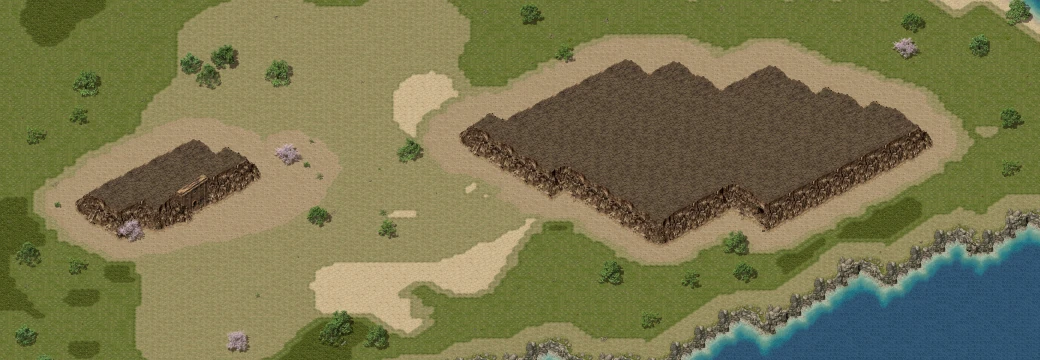
- Sometimes, a mesa. About one island in 10 has a big raised mesa with a cave's mouth in it that leads down into a mine of its own (see The mine under the mesa). About one in 50 has a small mesa with a temple's door.
The numbers
| What | How much |
|---|---|
| Price | 1,000,000 gold, once, from the guild purse. There is no rent. |
| Islands a guild may own | 3, counting any auction your guild is currently winning |
| Who may buy, sell, rename or abandon | A rank with Rent the guild hall and stop its renewal (the leader, unless you tick it for other ranks on the guild window's Manage tab) |
| Who may sail there | Every member of the guild that owns it |
| Who may build | A rank with Put buildings down on the guild's land, and take them away (the leader, unless you tick it for others) |
| Buildings on one island | Up to 100. The island's own trees and rocks don't count. |
| A building | 1,000 gold to put down; half of what was paid back when it's taken down |
| A tree, rock or bush | 100 gold to plant; clearing one of the island's own gives 50 |
Press G for the guild window and choose the Estate tab. Everything your guild holds is there, in three sections: Rentals (its hall), Islands and Castles (land it has won in a war). This chapter covers the Islands section; the hall and the land are in Wars and conquest.
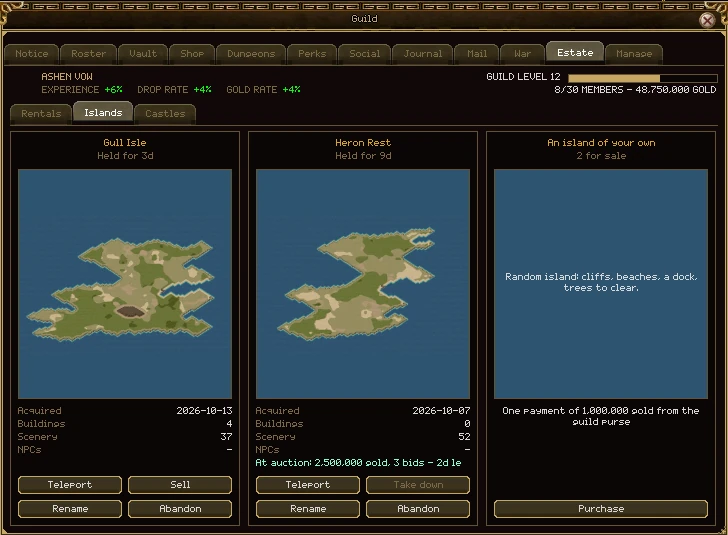
A guild can own three islands, so the section is one row of cards, as tall as the window: one card for each island, and the offer of another while there is room.
An island your guild owns
| Part | What it does |
|---|---|
| Its name | The name your guild gave it, exactly as typed. |
| Held for | How long your guild has owned it. |
| The picture | The island's map, once your game has the island: after you have sailed there, or once it has been downloaded ahead of time. Until then the card shows the sea. |
| Acquired | The day your guild bought it. |
| Buildings | How many buildings your guild has put down on it. |
| Scenery | How many trees and rocks stand on it: the ones it came with that nobody has cleared, and any your guild has planted. |
| NPCs | Not in yet. NPCs can't be placed on an island so far. |
| The sale line | Only while it is on the market: the asking price (or the top bid and how many bids) and the time left. |
| Teleport | Sails you to the island's dock. Greyed out, with the reason in its tooltip, when you can't go from where you are. If your game still has to download the island first, the tooltip says how much. |
| Leave | Shown instead of Teleport while you are on the island: back to where you sailed from. |
| Rename | Opens the name window to give it a new name (see Renaming and abandoning). |
| Abandon | Gives the island up for good. You have to type its name to confirm. |
| Sell | Puts it on the market (see Selling an island). |
| Take down | Shown instead of Sell while it is listed: takes the listing off the market. Press it twice. An auction can't be taken down once somebody has bid. |
The offer of another
While your guild has room for another island, the last card is An island of your own, with its price and Purchase. A button your rank can't use is greyed out, and its tooltip says why.
An island that has just been bought says Being made now or Being made: 3 in the queue until it is ready, and its Teleport button stays grey.
An island costs 1,000,000 gold from the guild purse, paid once. Nothing is taken until you have named it.
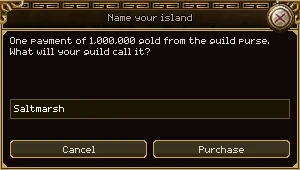
- Open the guild window (G), go to Estate and press Purchase on An island of your own.
- Type a name and press Purchase (or Enter). The button stays grey until the name follows the rules below.
- The gold leaves the purse and the island starts being made. It usually takes a minute or two, and every member is told when it is ready.
- Press Teleport on its card to sail there.
Names
- 1 to 20 characters: letters A to Z, digits 0 to 9 and spaces.
- No space at the start or end, and never two spaces together.
- No two islands may share a name, whatever the capitals. If somebody already has it, you're told and nothing is paid.
- The name is shown exactly as you typed it, in every language.
When it says no
- Your rank may not buy the guild an island. Ask your leader for the permission.
- The guild purse cannot pay for an island.
- Your guild already has as many islands as it may own. Three, counting an auction you're winning.
- Too many islands are being made just now. Try again in a few minutes. Nothing was paid.
If an island can't be made, the guild is told and the 1,000,000 gold goes straight back into the purse.
Teleport on the island's Estate card takes you to its dock; Leave brings you back to where you sailed from, or to the town you're bound to if that is gone.
When you can't sail
- While you are dead.
- From inside a dungeon, a war or the guild hall.
- From a map you couldn't use a town portal scroll on.
- While the island is still being made.
The first trip: downloading
An island is made after you installed the game, so your game fetches its map the first time you go. Usually it already has: while background fetching is on (Settings, O, Game, Maps, Fetch your island ahead), your game downloads your guild's islands quietly as soon as they are ready. If it hasn't, this window waits for it, and you stay where you are until it's done.
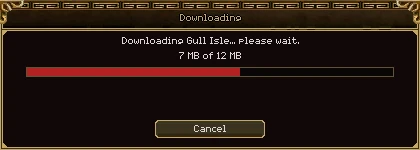
| Part | What it does |
|---|---|
| The bar | How much has arrived, out of how much. |
| Cancel | Stops the download, and you don't sail. |
| Try again | Shown when a download fails, with the reason above it: no answer from the download server, a file that arrived wrong, or no room on your disk. |
If the island still hasn't arrived after two minutes, the trip is called off with The island could not be downloaded in time. If that keeps happening, update the game from the launcher.
The island's minimap
A new island has no minimap picture of its own: your game draws one from the island's map the first time you're there, and keeps it. Until it is drawn the minimap shows plain ground with the dots on it. Buildings, trees and rocks are drawn over the top, and that layer is redrawn when somebody builds or clears. Settings, Game, Maps, Draw missing minimaps turns this off.
Stand on your guild's island (or in its rented hall) and open the guild window. A BUILD button appears beside the guild's name if your rank may build. It clears every other window away and opens the Build window on the right, so the world is what's left to look at.
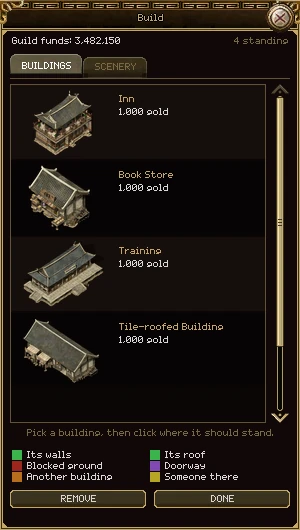
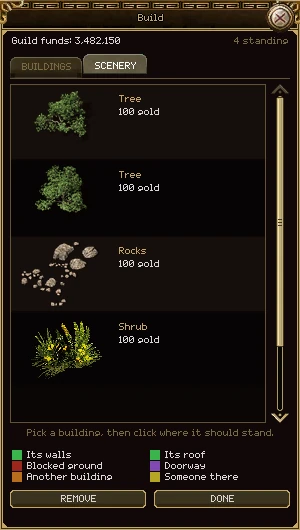
| Part | What it does |
|---|---|
| Guild funds | What is in the purse. Everything here is paid from it. |
| n standing | How many buildings your guild has put down here. |
| BUILDINGS, SCENERY | The two lists. SCENERY is only there on an island. |
| The list | Each piece's picture, name and price. A price in red is more than the purse holds. Click a row to pick it up; click it again to put it back. |
| The hint | What the pointer is doing now, and, in red, why a building can't go where it is. |
| The key | What the coloured cells under the pointer mean: Its walls and Its roof (green, the building's own cells), Blocked ground, Doorway, Another building and Someone there. |
| REMOVE | Switches to taking things down. It reads STOP REMOVING until you finish. |
| DONE | Closes the window. |
Putting a building down
- Click a row. The building follows the pointer as a ghost: green where it fits, red where it doesn't.
- Its cells are marked on the ground: solid green where it has walls, faint green under its roof. Any cell with something in the way is shaded and edged in red.
- Left-click the ground to build it. The ghost stays on the pointer, ready for the next one.
- Right-click or press Esc to put the ghost away. Esc again closes the window.
Taking one down
- Press REMOVE and move the pointer over a building, tree or rock. It is marked in red.
- Click it. The game asks Take down Inn? 500 gold goes back to the guild's funds.
- Press TAKE DOWN, or KEEP IT to change your mind.
The rules
- Within 20 cells of where you stand: about a screen.
- Every cell it covers, roof included, must be open ground. Not over water or a cliff, not on a doorway, and not over another building or a tree.
- Nobody may be standing where its walls will go: no player, creature, pet or dropped item.
- The purse must hold its price. Every building costs 1,000 gold.
- Taking a building down gives back half of what was paid for it.
- Walls block walking for everyone. A porch or the ground under a roof can still be walked on.
Clearing and planting
The island's own trees, bushes, rocks, flowers and puddles come off with REMOVE like a building, and each one gives 50 gold to the purse. The SCENERY tab plants them back for 100 gold each, anywhere a building could go. Nothing grows back by itself.
If the island is sold, every building, every cleared patch and every tree you planted goes with it. If it is abandoned, it's all lost, with nothing paid back. The guild's Journal tab records each building put down or taken away.
A guild that disbands loses every island it owns, with everything on them. Sell them first.
About one island in 10 has a big mesa with a cave's mouth in it. Walk in and you are on the first floor of the island's own mine.
- 1 to 10 floors. How deep it goes is part of the island and never changes. Every floor has a way back up, and every floor but the last a way down.
- Its name is the island's. A one-floor mine on Gull Isle is Gull Isle Mine; a deeper one's floors are Gull Isle Mine Lv 1, Lv 2 and so on. Rename the island and the mine follows.
- It is dark, and it has monsters. Floors 1 to 5 have the creatures of the Deserted Mine's first level; from floor 6 down, those of its second level.
- The walls can be mined. Floors 1 to 5 dig like the Deserted Mine Lv 1, floors 6 and below like Lv 2. What each kind of mine gives is in Upgrading, crafting, mining.
The smaller mesa, on about one island in 50, has a temple's door. It doesn't lead anywhere yet.
Both start from the island's card on the Estate tab and open the same small window. Both need the rank permission to rent the guild hall, and neither works while the island is on the market.
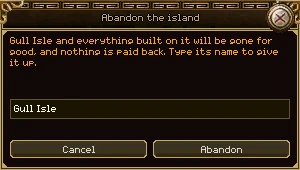
Renaming
Press Rename, type the new name and press Rename. The same rules for names apply. It is free, and the guild's Journal records who did it.
Abandoning
- Press Abandon on the island's row.
- Type the island's name into the box. Capitals don't matter.
- Press Abandon.
The island and everything built on it are gone at once, and nothing is paid back for either. Anybody standing on it is sent back to where they sailed from. If you want gold for it, sell it instead.
Press Sell on the island's Estate card. Islands are sold guild to guild, out of one purse and into another; no character carries the gold.
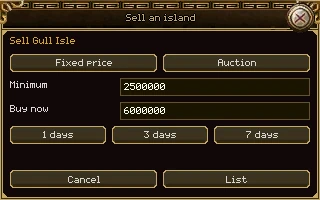
| Part | What it does |
|---|---|
| Fixed price, Auction | How it is sold. The box under them is labelled Price for a fixed price and Minimum for an auction. |
| Price | What a buyer pays. Digits only. |
| Minimum | The least you'll take at auction. Bidders don't see it: the listing only says whether the bids have reached it yet. |
| Buy now | Auction only, and optional: a price that ends the auction at once. It must be more than the minimum. |
| 1 day, 3 days, 7 days | How long it stays up. Three days unless you pick another. |
| List | Puts it on the market. Greyed out until the prices make sense. |
While it is listed
- It is still your guild's. Members can sail there, build and clear as before.
- It can't be renamed or abandoned: a buyer is buying what they saw.
- A fixed-price listing can be taken down at any time, for nothing. An auction can only be taken down while nobody has bid.
- A fixed-price listing that isn't bought comes down by itself at the end.
When it sells
- The price goes into your purse, less a 1% market tax.
- The island changes hands as it stands: its name, buildings, cleared ground and trees all go with it.
- Members of your guild standing on it are sent back to where they sailed from.
- An auction whose bids never reach the minimum doesn't sell. The island stays yours, and the top bidder gets their gold back.
Press Ctrl+S for the market and choose Islands. Every island any guild has up for sale is listed here, yours included.
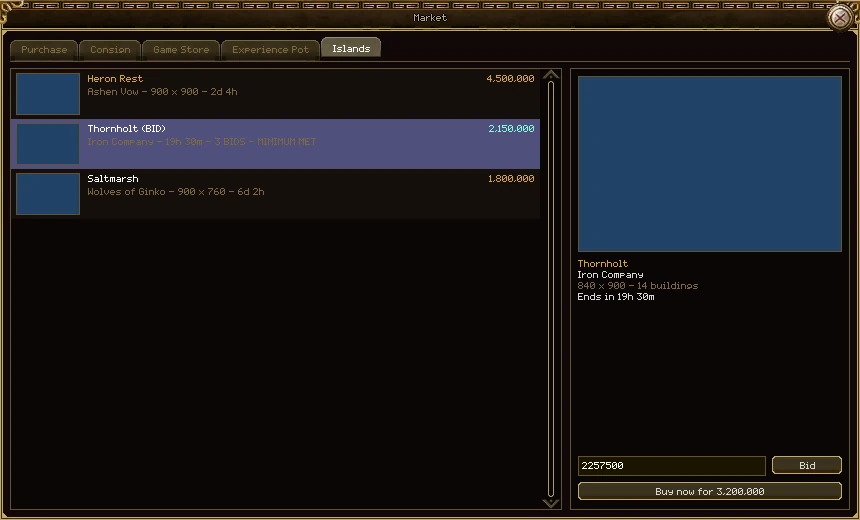
| Part | What it does |
|---|---|
| The list | One row per island: its name (with (BID) after it for an auction), the selling guild, its size or how the bidding stands, and the time left. Your own guild's names are in gold. |
| The price | In gold for a fixed price. For an auction, the top bid; before anybody has bid it shows 1 in grey, because any bid opens it. The seller's minimum is never shown. |
| The picture | A plain sea square. New islands have no preview yet; go and look round one before you buy it if you can. |
| The panel on the right | The picked island: name, guild, size, how many buildings stand on it, and when the listing ends. |
| Buy for price | Fixed price. Press it twice to buy. |
| The bid box and Bid | Auction. The box starts at the least you may bid; change it and press Bid twice. |
| Buy now for price | An auction with a buy-now price: pay that and it's yours at once. |
| Take down | Shown on your own guild's listings instead. |
Buying and bidding
- You need the rank permission to rent the guild hall, your guild needs room for another island, and the purse has to hold the price. A greyed button's tooltip says which is missing.
- You can't buy or bid on your own guild's island.
- A bid is taken from the purse straight away and held. If another guild outbids you, your gold goes back into the purse at once and the guild is told.
- Each bid must beat the last by at least 5%.
- A bid in the last 5 minutes pushes the end out to 5 minutes after it, so nobody can snipe it at the last second.
- An auction your guild is winning counts as one of its three islands until it ends.
- If the price changed while you were looking, the purchase is refused and nothing is paid. Look again and buy at the new price.