Press Q or the character button on the bottom panel. The character window has five tabs along the top; it opens on the one you left it on. The first, Equipment, shows your character wearing what you have on, with a slot round the edge for each piece.
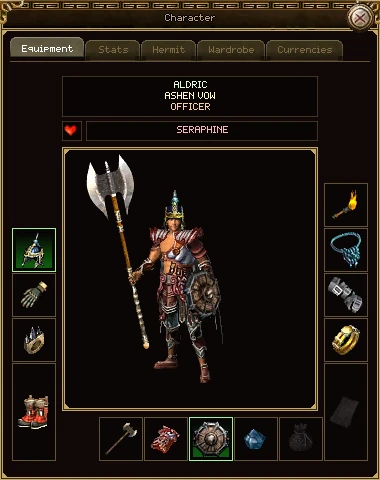
| Part | What it does |
|---|---|
| Name, guild, rank | Who you are, your guild and your rank in it. The two guild lines are blank if you're not in one. Click your name to open the appearance window. If you have a caption, it shows when you point at your name. |
| Heart and partner | Lit when you're married, with your partner's name beside it. Right-click the name to inspect them, invite them to your group or guild, whisper to them, or block them. Rows that can't work right now, such as inviting someone who isn't nearby, are shown dimmed. |
| The portrait | Your character as others see them: armour, helmet, weapon and shield, with any glow they give off. Point at a piece on the body to see its tooltip. |
| The slots | One for each thing you can wear. An empty slot shows a faint picture of what goes there. See the table below. |
The slots
| Slot | Where | What goes in it |
|---|---|---|
| Helmet | Left, top | A helmet or hood. It covers your hair. |
| Bracelets | Left and right, second | Two bracelets or gauntlets, one each side. |
| Rings | Left and right, third | Two rings, one each side. |
| Boots | Left, bottom (tall) | Boots and shoes. |
| Torch | Right, top | A candle or torch, which lights the way on dark maps. |
| Necklace | Right, second | A necklace or pendant. |
| Amulet | Right, bottom (tall) | A taoist's talismans, which some of their spells use up. |
| Weapon | Bottom row | Your weapon. It also earns experience of its own as you fight. |
| Armour | Bottom row | Your armour or robe. |
| Shield | Bottom row | A shield. |
| Flower | Bottom row | A flower that can bring you back to life, such as the Thorned Rose, or a stone that breaks. You can't wear both. |
| Poison | Bottom row | A taoist's green or red poison. |
Wearing and taking off
- To wear something, right-click it in your bag. Or pick it up and click its slot, or click anywhere on the portrait and it goes where it belongs. A ring or bracelet goes to whichever side is free; if both are full it replaces the left one.
- While you hold a piece, it's drawn faintly on your body where it would go, so you can see how it looks before you put it on.
- To take something off, right-click it, in its slot or on the body. It goes back in your bag.
- Click a worn piece to pick it up and move it somewhere else.
- Middle-click locks or unlocks it, the same as in the bag. See locking an item.
- Shift and click with the chat line open puts a link to the item in your message.
What you wear has its own weight limit, and so do your hands. If a piece would take you over either, it won't go on. The two limits are the Body W and Hand W lines on the Stats tab. Your weapon, shield and torch count as in your hands; everything else counts on your body.
The second tab adds up everything about your character: your level, your gear, your hermit points and your class. Scroll it with the mouse wheel or the bar on the right.
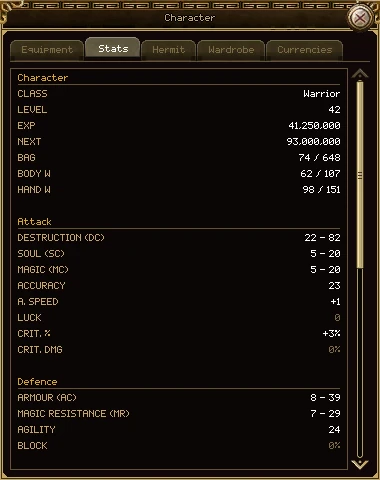
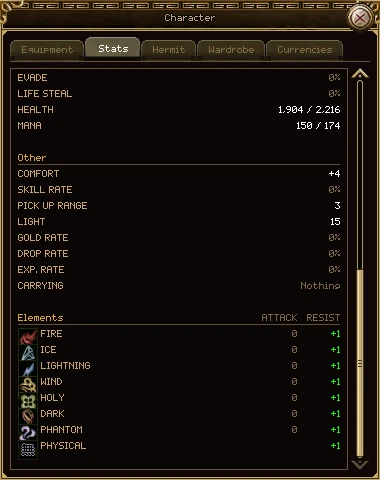
A figure that is nothing is drawn dim, so the ones that matter stand out.
Character
| Line | What it means |
|---|---|
| Class, Level | Your class and level. |
| Exp, Next | The experience you have towards your next level, and how much that level costs in all. |
| Bag | The weight in your bag against the most you can carry. Over the limit it turns red, and your attacks, spells and steps all slow down. |
| Body W | The weight of what you're wearing against its limit. Nothing goes on that would take you over. |
| Hand W | The same for your weapon, shield and torch. |
Attack
| Line | What it means |
|---|---|
| Destruction (DC) | Physical damage, low to high. Each blow rolls between the two. Warriors and assassins live on it. |
| Soul (SC) | The power of a taoist's spells. |
| Magic (MC) | The power of a wizard's spells. |
| Accuracy | Whether your blows land. It's measured against the target's agility. Spells never miss this way. |
| A. Speed | Attack speed. Each point shortens the gap between swings, down to a floor. |
| Luck | Pulls each damage roll towards the top of your range. |
| Crit. % | The chance a blow is a critical hit. |
| Crit. Dmg | How much more a critical hit does, against monsters. A critical hit on a player is always the same size, whatever this says. |
Defence
| Line | What it means |
|---|---|
| Armour (AC) | Takes damage off physical blows. |
| Magic Resistance (MR) | Takes damage off spells. |
| Agility | Makes you harder to hit. Set against the attacker's accuracy. |
| Block | The chance to turn a blow aside completely. A player's blow is half as easy to block as a monster's. |
| Evade | The chance to dodge a blow. |
| Life Steal | A share of the damage you do comes back to you as health. |
| Health, Mana | What you have now, out of your most. |
Other
| Line | What it means |
|---|---|
| Comfort | Shortens the wait between natural recoveries of health and mana. |
| Skill Rate | Makes your skills level faster as you use them. |
| Pick Up Range | How many cells away you can pick things up from. It starts at 1 and grows by 1 every 20 levels; some gear adds more. |
| Light | How far you can see on a dark map. A torch or candle raises it. |
| Gold, Drop, Exp. Rate | How much more gold, loot and experience you get, from your gear and buffs. |
| Carrying | Special powers your gear gives you, such as a ring of teleport or a recall set. In red if one of them is a curse, such as dropping items when you die. |
Elements
Eight elements: fire, ice, lightning, wind, holy, dark, phantom and physical. Attack is the element your blows carry, in blue. Resist is green for a resistance and red for a weakness. Physical has a resistance but no attack.
You level by earning experience: mostly by killing monsters, and also from quests and dungeon rewards. The level cap is 80.
| To go from level | You need |
|---|---|
| 1 to 2 | 172 |
| 10 to 11 | 33,600 |
| 20 to 21 | 710,000 |
| 30 to 31 | 7,540,000 |
| 40 to 41 | 91,200,000 |
| 50 to 51 | 222,000,000 |
| 60 to 61 | 1,690,000,000 |
| 79 to 80 | 39,600,000,000 |
When you level
- Your maximum health goes up, and your health and mana are filled.
- Everyone near you sees blue light rise round you. On every 10th level (10, 20, 30 and so on) it's a blue dragon instead.
- New quests may open up for your level.
- From level 20 you earn a hermit point.
Hunt near your level
A monster up to 3 levels below you pays full experience. Below that, you get 12% less for each level further down, never less than 15% of its value. A monster above your level never pays more than its value.
In a group
When you kill something in a group, every member who is alive and close enough to see the body shares the experience. The total is 6% more per member than the monster is worth, and it's split by level, so a higher-level member takes a bigger share. The level rule above then applies to each member's own share.
Experience rates
Your experience rate (from gear, buffs and your guild) is added up and applied to every kill. Your weapon takes a tenth on top, for its own progress, and so do accessories that level. None of it is taken from you.
At level 80 experience keeps adding up, it just doesn't make another level. What you earn there can go into your account's experience pot, on the market's Experience Pot tab (see Trade, market and mail).
Every character starts with 5 accuracy and 15 agility (a taoist 18). On top of that, your class gains a point of each every few levels, for good. Nothing to do: it just happens as you level.
| Class | Accuracy | Agility | At level 80 |
|---|---|---|---|
| Warrior | +1 every 4 levels | +1 every 8 levels | +20 accuracy, +10 agility |
| Wizard | +1 every 8 levels | +1 every 6 levels | +10 accuracy, +13 agility |
| Taoist | +1 every 5 levels | +1 every 8 levels | +16 accuracy, +10 agility |
| Assassin | +1 every 4 levels | +1 every 4 levels | +20 accuracy, +20 agility |
So the warrior is the accurate class and the assassin the hardest to hit. A wizard gets agility first, because spells never roll accuracy. The points are already in the figures on the Stats tab; there's no separate line for them.
From level 20 you earn a hermit point every level: one at 20 and one more at every level after it, 61 by level 80. Spend them on the third tab of the character window, one stat at a time.
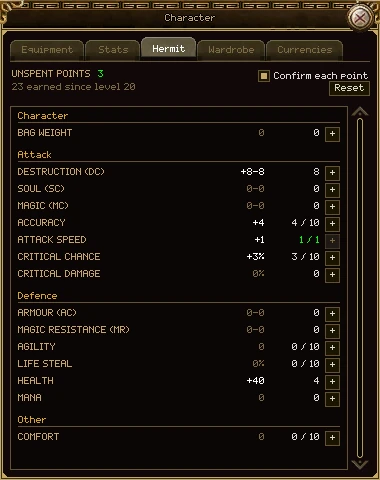
| Part | What it does |
|---|---|
| Unspent points | Points you can spend now, in green when you have some. |
| The line under it | How many you've earned since level 20, and how many came from Hermit Point items. Before level 20 it says when your first point comes. |
| Confirm each point | Ticked, every spend asks first. Untick it to spend with one click. It's ticked again each time you start the game. |
| Reset | Hands back every point you've spent. See below. |
| An option's row | Its name, what your points in it give you in total, how many points are in it (and its limit, if it has one: 4 / 10), and its +. Point at a row to see what one point is worth. |
| + | Spends a point. Shift and click spends up to ten. Dimmed when you have no points or the option is full. |
What a point buys
| Option | One point | Most points |
|---|---|---|
| Bag weight | +10 bag weight | No limit |
| Destruction (DC), Soul (SC), Magic (MC) | +1 to both the low and the high end | No limit |
| Accuracy | +1 | 10 |
| Attack speed | +1 | 1 |
| Critical chance | +1% | 10 |
| Critical damage | +0.1%, against monsters only | No limit |
| Armour (AC), Magic Resistance (MR) | +1 to both ends | No limit |
| Agility | +1 | 10 |
| Life steal | +1% | 10 |
| Health, Mana | +10 | No limit |
| Comfort | +1 | 10 |
Spending
- Press Q and open the Hermit tab.
- Click the + beside what you want, or Shift and click for up to ten.
- If Confirm each point is ticked, choose Yes. The stat goes up straight away.
Getting points back
A point stays spent until you take all of them back. You can't take back one option on its own. There are three ways:
| How | Where | What it costs |
|---|---|---|
| The Reset button | Only in a safe zone, such as a town | Free below level 80. From level 80, 1,000,000 experience each time; if you have less than that, it's refused. |
| Potion of Forgetfulness (level 40 to use) | Anywhere | Up to 1,000,000 experience (whatever you have, if it's less) |
| Potion of Oblivion (level 40 to use) | Anywhere | No experience |
The Reset button always asks first, and names the price if there is one. Point at it to see what it would cost you now.
Hermit Point items
A Hermit Point is an item that gives you one extra point when you read it. You buy it on the experience pot's shelf for 1,000,000 pot experience, and you have to be level 80 to read it, though anyone can buy, trade or sell one. Points from these items are yours for good: a reset hands back what you spent, but never takes these away.
The fifth tab lists what you have to spend.
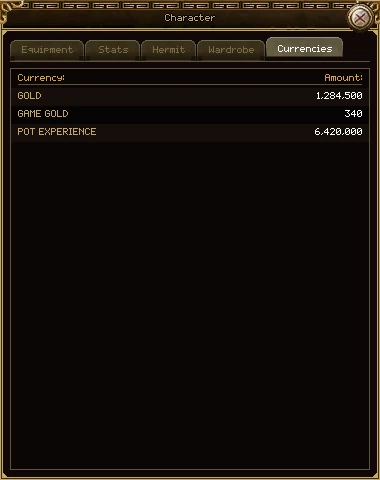
| Line | What it is |
|---|---|
| Gold | This character's gold, the same figure as at the bottom of your bag. |
| Game Gold | Your account's points for the game store. Every character on the account shares them. |
| Pot Experience | What's in your account's experience pot, which every character on the account shares. |
A dash means the figure hasn't arrived yet. It's not the same as nought.
The fourth tab will hold the things you own rather than wear for their stats, such as costumes. For now it says Nothing here yet.
Click your name at the top of the Equipment tab. The appearance window changes your hairstyle, your body, your name and your caption. Each change uses up an item from your bag.
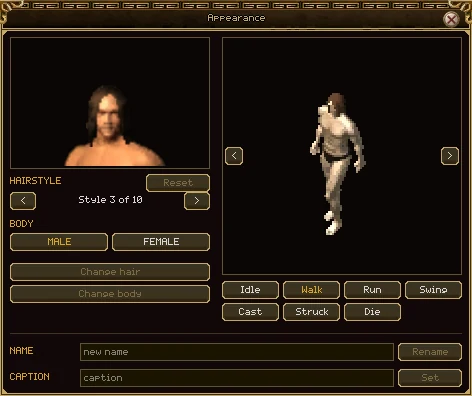
| Part | What it does | Uses up |
|---|---|---|
| The two pictures | The style and body you're looking at, not yet yours: your head close up, and your whole character with nothing on. Turn them with < > and try Idle, Walk, Run, Swing, Cast, Struck and Die. | — |
| Hairstyle < > | Steps through the styles. Before the first is Bald. Men have 10 styles and women 11; assassins have 5. | — |
| Male, Female | Picks the body to look at. The pictures change with it. | — |
| Reset | Back to how you look now. | — |
| Change hair | Gives you the style shown. Only lit when it's different from yours, on the body you have. | Hair Change |
| Change body | Changes your character to the body and style shown. Take your armour off first: it's cut differently for each. | Gender Change |
| Name box, Rename | Gives your character a new name, 3 to 16 characters. It's refused if someone already has it. | Name Change |
| Caption box, Set | A line of up to 24 characters under your name, which everyone near you can read. Set an empty one to take it off. | A caption item |
A button is drawn brighter when your bag holds the item it needs, but every button can be pressed: if you don't have the item, you're told so.
None of the Hair Change, Gender Change and Name Change items is on sale anywhere yet, and the caption's item isn't in the game. The window is ready for when they are.
The inspect window is someone else's character window. Open it by holding Ctrl and right-clicking another player, by choosing Inspect on their name (on your partner, in your group, in a guild roster or in the rankings), or by typing /inspect name in chat.
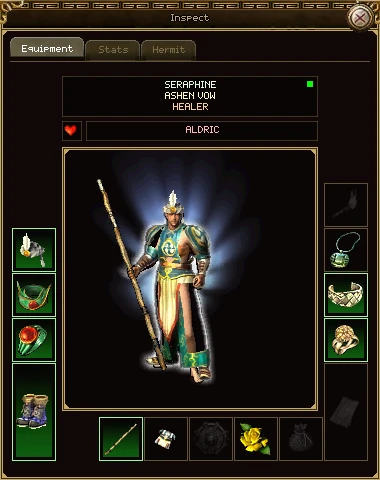
- It has three tabs: Equipment, Stats and Hermit. Their wardrobe and their purse are nobody else's business.
- Everything is read-only. Point at a piece for its tooltip, but you can't take anything, spend their points or change a thing.
- It works on players who aren't online too. Then it shows them as they were when they last logged out, and there's no green light.
- Their Stats tab shows their most health and mana, not what they have right now, and leaves out their experience and their bag.
- Right-click their partner's name to inspect the partner too.
- It opens beside your own character window, so you can compare the two.