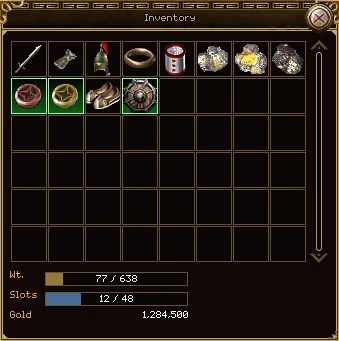
Press W or the bag button on the bottom panel. Everything you carry that you aren't wearing is here, in one grid.
| Part | What it does |
|---|---|
| The grid | One cell per slot your character has. When you unlock more, the grid gets more cells, not more windows; scroll with the bar on the right or the mouse wheel. A gap in the grid is an empty slot. |
| Wt. | How much you're carrying against the most you can. Going over slows your attacks, spells and steps. |
| Slots | How many cells are full, out of how many you have. A new character has 48. Each Bag Extension, from the game store, adds a row of 8, up to 192. |
| Gold | Your gold. Click it to pick some up in hand, then click the ground to drop it (you'll be asked how much) or click the line again to put it back. |
| Selling | Only while a shop is open: how many items you've picked to sell, and the Sell button that sells them all at once. |
Moving things
- Click an item to pick it up. It follows the pointer until you click where it goes: another cell, a slot on the character window, a shop, or the ground to drop it.
- Right-click uses an item where it lies. For a weapon, armour or a ring, using it means wearing it.
- Shift and right-click a stack to split it. The amount window asks how many.
- Middle-click locks an item, so it can't be sold or dropped by mistake.
- Shift and click with the chat line open links the item in your message.
Nothing in the bag can be destroyed. To get rid of an item, sell it or drop it on the ground.
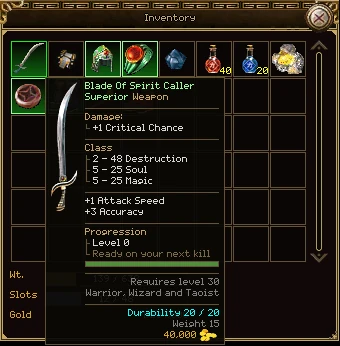
Rest the pointer on any item, in your bag, on your character, in a shop, in storage or on the ground, and its tooltip says everything about it.
| Part | What it tells you |
|---|---|
| Name | In the colour of its quality. A stack shows its count after the name. |
| Quality and kind | The second line: Superior Weapon, Common Ring. |
| Damage, Protection, Class | Its stats, grouped. Class holds the destruction, soul and magic ranges, which matter to different classes. Anything else it gives is listed under them. |
| Sockets | The gems set in it, and its empty sockets. See Upgrading, crafting, mining. |
| Set | For a piece of a set: the set's name, how many pieces you're wearing, every piece (lime for worn, grey for missing) and the bonus. You only get the bonus with every piece on, and a broken piece doesn't count. |
| Progression | For a weapon or an accessory that levels: its level, and how close it is to the next. |
| Requires | The level, and the classes that can use it. A requirement you don't meet is in red. |
| Durability | How worn it is, out of its most. See wear and repair. |
| Weight | What it adds to your bag, or to what you wear. |
| The gold figure | In your bag, in gold: what a shop would give you for it. On a shop's shelf, in white: what it costs. |
| Warnings | Cannot be traded, Cannot be dropped, Cannot be repaired, how long it lasts, and for a stone, that it breaks. |
Hold Alt for more
Some gear has had points added to it: rolled when it dropped, refined, upgraded or socketed. The tooltip shows the total. Hold Alt and each stat lists where its points came from, and how many more each kind of upgrade can add. On a gem or an orb, Alt shows what it goes into and how to use it.
Most armour looks different on a man and a woman. Your bag and your character window show the picture for your own body, and the inspect window shows the other player's.
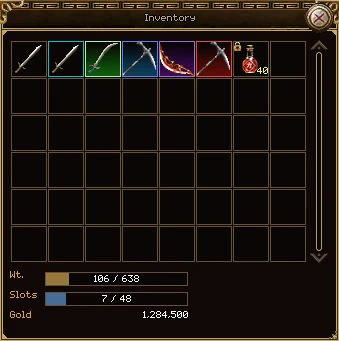
Every item has a quality. Its name is drawn in that colour everywhere you see it: a tooltip, the ground, a shop, the market, mail and chat. A slot holding anything better than common is ringed and washed in the same colour.
| Quality | Colour | In a slot | On the ground |
|---|---|---|---|
| Trash | Grey | No ring | No glint |
| Common | White | No ring | No glint |
| Common, with extra stats | Teal | Teal ring | Blue glint |
| Superior | Pale green | Green ring | Green glint |
| Rare | Blue | Blue ring | Glint and a blue light |
| Elite | Purple | Purple ring | Purple glint |
| Legendary | Red | Red ring | Glint and a red light |
From worst to best that's trash, common, superior, rare, elite, legendary. A common item turns teal when it has extra points on it, so it's worth a second look; a better item keeps its own colour whatever is added. Every pile on the ground also twinkles now and then, whatever it is.
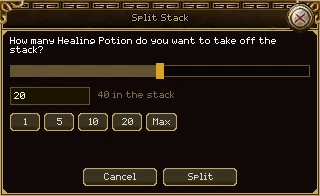
Hold Shift and right-click a stack in your bag. The amount window asks how many to take off, starting at half. The tooltip of every stack in the bag reminds you of this.
| Part | What it does |
|---|---|
| The slider | Drag it, or click anywhere on it to jump there. |
| The box | Type a number. It takes digits only, and a number above the most you can take is pulled back to it. |
| 1, 5, 10, 20, 50, 100 | Standard amounts. Only the ones smaller than the stack are shown. |
| Half | Half the stack, shown when it isn't already one of the standard amounts. |
| Max | The most you can take: one fewer than the stack. |
| Split, Cancel | Do it, or don't. Enter splits too. |
The part you take off goes into a free cell of your bag, so you need one. You can't split a stack in storage: split it in your bag and put the part away.
The same window opens when a dungeon run's loot leader gives some of a stack to a member. See Dungeons.
Click the Gold line at the bottom of your bag. A pile of coins follows the pointer. Click the ground, and you're asked how much to drop.
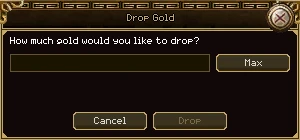
- The box takes digits only. Max fills in everything you have.
- Drop stays dimmed until the amount is at least 1 and no more than you have. Enter drops too.
- To change your mind with the coins in hand, click the Gold line again.
- Gold you drop is anyone's straight away.
Items on the ground sparkle, and the nearest one's name shows near the bottom of the screen with the key that picks it up.
Picking up
- Hold Tab to pick up everything near you, one thing at a time.
- You can reach as far as your pick up range on the Stats tab: 1 cell, plus one more every 20 levels, plus what your gear adds. It's a square round you, so the corners count.
- Each cell can hold up to 9 items. Without the pile window, you always get the one on top.
The pile window
Hold Ctrl and point at a cell with things on it. A box opens beside it showing every item on that cell, newest first.
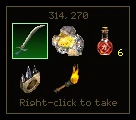
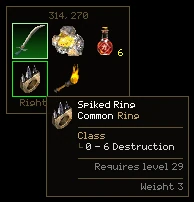
| Part | What it does |
|---|---|
| The two numbers | Where the cell is on the map, so you can tell piles apart (or tell a friend where one is). |
| The grid | Up to nine items. Point at one for its whole tooltip, including any extra stats it rolled. |
| Right-click to take | Right-click an item to pick up that one, wherever it is in the pile. If the cell is out of your reach, the items are dimmed and the line says Too far to reach. |
The box stays open while the pointer is inside it, so you can move onto the item you want. It closes when you let go of Ctrl, or move off both the box and the pile.
What a monster drops is yours. Nobody else sees it for the first five minutes.
| For | Who sees it | Who can take it |
|---|---|---|
| The first 5 minutes | Only you | You, and your companion |
| The next 10 minutes | Everyone nearby | Anyone |
| After 15 minutes | It's gone. | |
In a group
When a group kills a monster, each member rolls the monster's loot for themselves, with their own drop and gold rates. Nothing is divided. Every member who is alive and near enough to see the body gets a roll, and the killer always does. You don't see each other's drops: each of you sees only your own.
Gold
A monster's gold falls on the ground as your own pile, private like your items. Nothing is shared out across a group: each member who rolled has their own pile. If your companion picks gold up, it goes straight into your purse.
The small print
- Things that fall to the ground for you are private too: ore you dig, a dungeon reward your bag had no room for.
- Something you drop yourself is anyone's straight away.
- Logging out and back in doesn't lose your claim: the loot is your character's, not your session's.
- In a guild's dungeon run, the loot goes into the run's loot bag instead. See Dungeons.
- A few creatures also have a rare second table, rolled on top of their usual loot. The tougher the creature, the longer the odds, and your drop rate shortens them.
Some items hold other items. Right-click one in your bag and a window opens with what's inside. It has no close button: it closes when you've taken something.
Bundles
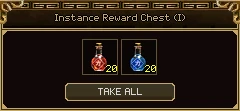
A bundle shows exactly what's in it and costs nothing to open. Either you take everything (Take all), or you click one item and Take one. The chest you get for clearing a dungeon is a bundle. You need room in your bag: if you don't have it, the bundle stays a bundle until you do.
Loot boxes
A loot box is a game of chance, played with gold only. It deals a row of prizes face up, some rarer than others.
- Open it from your bag. It's free, and the prizes are face up.
- Reshuffle for a new row, for 5,000 gold each time. A box gets 5 reshuffles in its life.
- Settle on this arrangement when you like what you see. The cards turn face down and are shuffled.
- Click a card to turn it over. The first costs 2,000 gold, and each one after that costs 2,000 more than the last.
- Click a card you've turned over and Take it. That uses up the box.
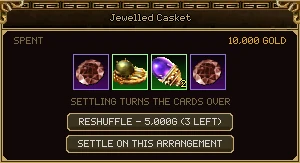
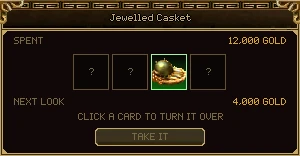
Spent, at the top, is everything the box has cost you so far, whether you've won anything or not. Next look is what the next card will cost.
Press S. Storage is your account's vault: every character on the account shares it. It opens your bag beside it.
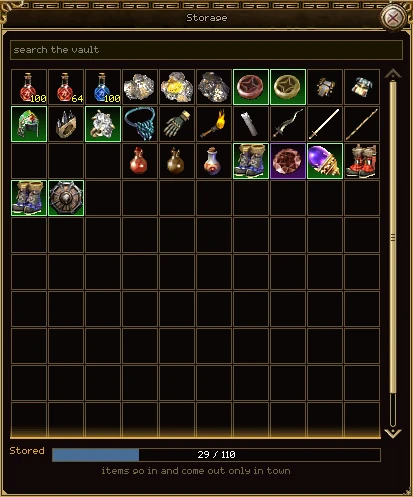
| Part | What it does |
|---|---|
| Search the vault | Type part of a name. What doesn't match is dimmed, and stays where it is. The line at the bottom says how many match. |
| The grid | Ten across, every slot your vault has. Scroll it with the wheel or the bar, and drag the window's bottom edge to show more rows. |
| Stored | Slots used, out of how many you have. Orange when it's full. |
Putting things in and taking them out
- Right-click an item in your bag to send it to the vault, and right-click one in the vault to bring it back. Shift and click does the same.
- Or pick it up and click where it goes.
- Something that stacks tops up the stacks already in the vault first, then takes a new slot. If the vault is full, it takes what its stacks have room for and the rest stays in your bag.
- Taking something out needs a free cell in your bag.
The rules
- Only in town. You can open the window anywhere and look, but items only go in and come out in a safe zone. A war isn't a town.
- A vault starts with 100 slots. Each Additional Vault, from the game store, adds 10, up to 1,000.
- Take a piece off before you store it.
Middle-click an item to lock it, and again to unlock it. A padlock shows in the corner of its cell. It works the same in your bag, on your character and in storage.
A locked item can't be:
- sold to a shop,
- dropped on the ground,
- traded, posted or put on the market.
If you try, you're told it's locked and how to unlock it. A locked item is also never one of the things you drop when you die. It does not save a stone that breaks.
Stones give a little power from your flower slot, and shatter if a monster kills you.
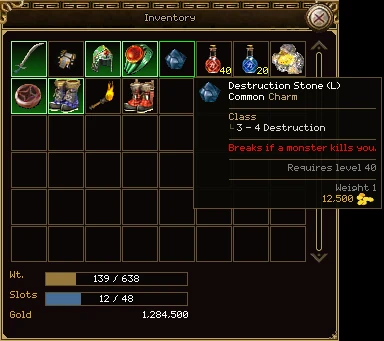
- A stone goes in the flower slot of the character window, where a revive flower would. So you choose: a flower that can save you, or a stone's power. Not both.
- It breaks only when a monster kills you, or a monster's poison. It's gone for good, and you're told, for example, Your Destruction Stone (L) shattered.
- It's safe if a player kills you, or a player's pet. It's also safe if you die in a war, in a safe zone, or on a map where nothing drops when you die.
- Being saved from death (by a revive or a taoist's spell) isn't dying, so the stone is fine.
- Locking it doesn't protect it.
- Stones come from monsters only. No shop sells them.
| Stone | S (lv 10) | M (lv 25) | L (lv 40) | XL (lv 55) | Great (lv 70) |
|---|---|---|---|---|---|
| Destruction | DC 0-1 | DC 2-2 | DC 3-4 | DC 5-6 | DC 7-8 |
| Magic | MC 0-1 | MC 2-2 | MC 3-4 | MC 5-6 | MC 7-8 |
| Soul | SC 0-1 | SC 2-2 | SC 3-4 | SC 5-6 | SC 7-8 |
| Health | +20 HP | +55 HP | +110 HP | +190 HP | +330 HP |
| Mana | +15 MP | +50 MP | +110 MP | +200 MP | +290 MP |
| Power | +20 HP, +15 MP | +55 HP, +50 MP | +110 HP, +110 MP | +190 HP, +200 MP | +330 HP, +290 MP |
Show an item to everyone reading a chat line: they see its name in its quality's colour, and its full tooltip when they point at it.
- Open the chat line (Enter) and start typing, for example /trade WTS.
- Hold Shift and click the item: in your bag, on your character, in storage or in the guild vault. The link goes in where the cursor is.
- Finish the line and send it.
- A Shift-click links that item: a snapshot with every refine, gem, socket and level on it.
- Ctrl and Shift and click links the kind of item instead, the plain tooltip a shop would show.
- Each reader sees the name in their own language.
- A link to one item lasts 30 days. After that it reads [expired link].
- A link that won't fit in the line isn't put in at all.
- In a speech bubble over your head, a link is just the name in brackets.
With the chat line closed, Shift and click does what it always does.
Gear wears as you fight. The tooltip's Durability line shows how much it has left, out of its most.
- When durability reaches nought the piece is broken. It stays on you, but it does nothing until it's mended, and its tooltip says Worn out - it is doing nothing. A broken piece doesn't count towards a set.
- When a worn piece runs low, a small red picture of it appears on the screen. Alt and D switches that warning on and off. See The screen and controls.
- A smith mends gear for gold. An ordinary repair costs the piece a little of its most durability each time. See Upgrading, crafting, mining.
- Some items say Cannot be repaired. When they're worn out, they're done.