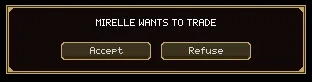
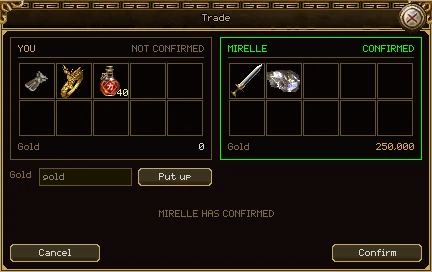
Stand next to another player, point at them and press T. If they accept, a table opens with your offer on one side and theirs on the other. Nothing changes hands until you have both confirmed.
| Part | What it does |
|---|---|
| You | What you are offering: up to 10 items and some gold. Click one of your items to take it back off the table. |
| The other side | What they are offering. You can look and hover for tooltips, but not touch. |
| Confirmed / Not confirmed | Whether that side has agreed. A confirmed side is framed in green. |
| Gold and Put up | Type an amount and press Put up (or Enter). To take your gold back off, clear the box and press it again. |
| The note | What happens next: make your offer, they have confirmed, waiting for them, or swapping. |
| Cancel | Calls the trade off. Closing the window does the same. |
| Confirm | Agrees to the table as it stands. It says Confirmed once you have. |
- Click items in your bag to put them on the table, and put up any gold.
- Check what the other side is offering.
- Both of you press Confirm.
- Everything swaps at once, or nothing does. TRADE DONE shows on your screen when it is.
The rules
- Any change clears both confirmations. If either of you adds, takes back or changes anything, you both have to confirm again. Always look at the table one last time.
- Everything is checked again at the moment of the swap. If an item or the gold is no longer there, or either bag hasn't room, the whole trade is called off.
- Moving, dying or logging out ends the trade. You must be on the same map, next to each other.
- An item goes on the table as a whole stack. To trade part of one, split it first with Shift and right-click (see Items and the bag).
- Worn items, locked items and anything that can't be traded stay in your bag.
- Ctrl+T stops anyone asking you to trade. NOT TRADING shows on your screen while it is off; press it again to turn trading back on.
Press Ctrl+S, or Market on the menu (N). One window holds the whole economy, in five tabs.
| Tab | What it is | Also opened by |
|---|---|---|
| Purchase | Everything other players are selling. | |
| Consign | What you are selling, and the counter to sell more. | |
| Game Store | Items for Game Gold. | Y |
| Experience Pot | Your account's banked experience, spent on scrolls. | Experience Pot on the menu |
| Islands | Islands guilds are selling. |
- The market is shared by everybody on the server, and listings survive a restart.
- You can browse, buy and bid anywhere. Putting something up for sale needs a town.
- Every button that spends something asks twice: the first click turns it into Sure? for 3 seconds, and the second does it.
- A page can be out of date the moment it arrives. If a price has changed since you looked, the purchase is refused rather than charged. Press Refresh and look again.
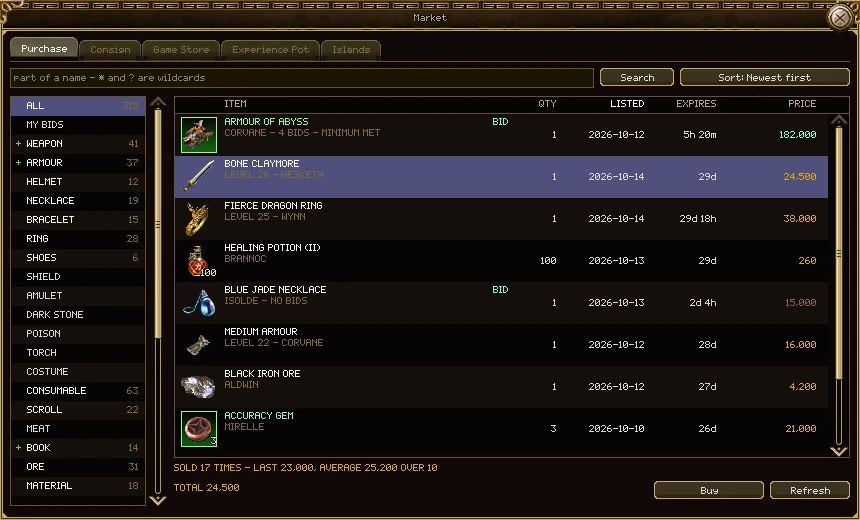
Everything on sale, newest first. Search by name, pick a kind of item on the left, and pick a listing to buy it or bid on it.
| Part | What it does |
|---|---|
| Search | Part of a name. * and ? are wildcards: "ore" finds every ore,
"small * potion" finds the small health and mana potions. Press Search or Enter. |
| Sort | Newest or oldest, price, quantity, level, name, or ending soonest. Clicking a column's heading sorts by it, and clicking again turns it round. |
| The kinds | Every kind of item that can be sold, with how many are on sale. Weapons, armour and books open into the four classes; a class shows what every class may use as well. |
| My Bids | Every auction you are bidding on, leading or not. |
| The listings | The item, who is selling it and the level it needs; how many; when it was listed; how long it has left (red under an hour); and the price. An auction is marked BID, and its price is the leading bid, or the lowest first bid (dimmed) when nobody has bid. Your own listings are in gold. |
| The line under the table | For a fixed price, what this item has sold for: how many times, the last price and the average. For an auction, the leading bid and how many bids. |
| Quantity | For a stack: how many to buy. You can buy part of someone's stack. |
| Total and Buy | What you'll pay, and the button that pays it. Grey on your own listings. |
| Refresh | Asks for the page again. |
What you get
- A fixed-price purchase goes straight into your bag. If your bag is full it lands at your feet, so make room first. If you left before the sale went through, it comes by mail.
- You pay the price on the page. A buyer who loses the race for the last one gets their gold back.
- You can't buy from, or bid on, your own account's listings.
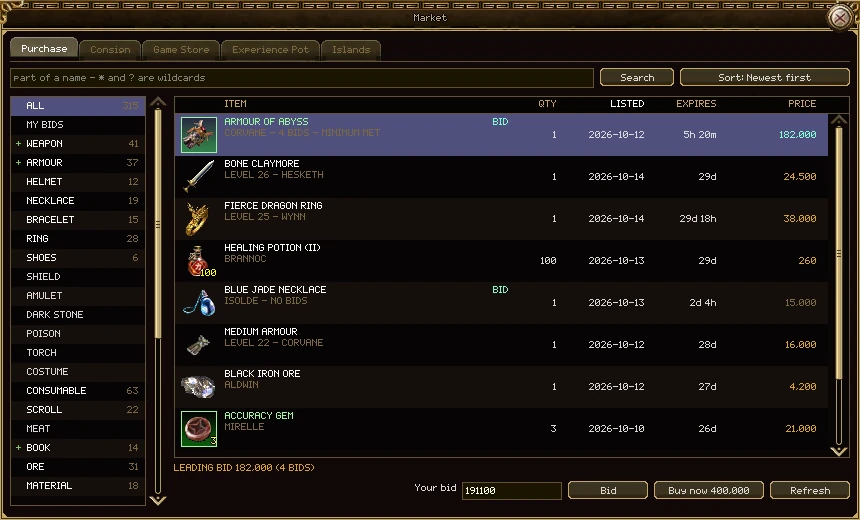
An auction sells the whole lot to the highest bidder when it ends. Twelve potions at auction are one lot at one price.
- Pick the auction. The bid box is filled with the least bid that will be taken.
- Change it if you like, and press Bid twice. The gold leaves your purse at once and is held against the auction.
- If somebody bids higher, your gold comes back to you by mail, and you are told if you are online.
- Or press Buy now, when the seller set a buy-now price, to end it at once at that price.
| Rule | How it works |
|---|---|
| Lengths | 1, 3 or 7 days, chosen by the seller |
| A new bid | At least 5% more than the leading bid (and at least 1 gold more) |
| Late bids | A bid in the last 5 minutes pushes the end back to 5 minutes after it, so nobody wins by bidding in the final second |
| The minimum | Optional and secret. Bids below it are taken, but the auction only sells if the leading bid reaches it. The list says minimum met or minimum not met. |
| Buy now | Optional. It stays on offer while the leading bid is below it; a bid at or above it buys the lot outright. |
| Cancelling | The seller can only take an auction down while nobody has bid on it |
When it ends
| At the end | The item | The gold |
|---|---|---|
| A bid at or above the minimum (or any bid, with no minimum) | To the winner, by mail | The winning bid less 1% commission, to the seller, by mail |
| Bids, none reaching the minimum | Back to the seller, by mail | The leading bid back to its bidder, by mail |
| No bids | Back to the seller, by mail | - |
What you have up for sale, and the counter to sell something else. You must be in a town to consign.
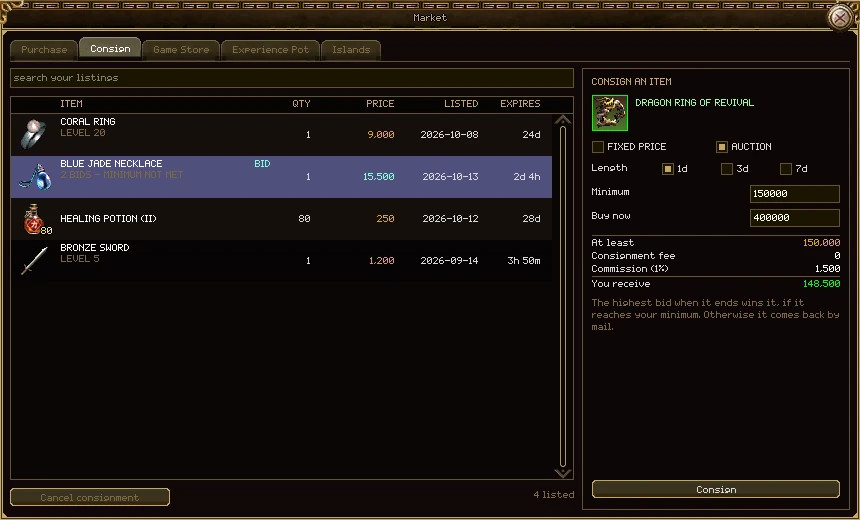
| Part | What it does |
|---|---|
| Search your listings | Narrows your own list as you type. |
| Your listings | Everything you have up: how many, the price (or an auction's bid), when it was listed and how long is left. |
| Cancel consignment | Takes the picked listing down, and the item comes back to your bag whole. Grey on an auction somebody has bid on. |
| The item slot | Right-click an item in your bag to put it here, or pick it up and click the slot. Click the slot again to take it off. The item stays in your bag, greyed, until you press Consign. |
| Quantity | For a stack: how many of it to sell. |
| Fixed price / Auction | How to sell it. |
| Price each | A fixed price is per item. |
| Length, Minimum, Buy now | For an auction: how long it runs, and the two optional prices, each for the whole lot. A buy-now below the minimum isn't allowed. |
| The sum | The sale price (for an auction, the least it can sell for), the fee, the commission and what you will receive. |
| Consign | Puts it on the market. |
The numbers
| What | How much |
|---|---|
| Listing fee | None |
| Commission | 1% of the sale, rounded down, taken from your takings |
| A fixed-price listing lasts | 30 days |
| An auction lasts | 1, 3 or 7 days |
- Your takings arrive by mail, from the Market Place, whether you are online or not.
- A listing that ends unsold comes back to you by mail.
- Worn, locked and untradeable items can't be listed. Take armour off first.
- A price can't be changed. Cancel the listing and put it up again instead.
Press Y for the market's Game Store tab. It sells items for Game Gold, which belongs to your account rather than to one character.
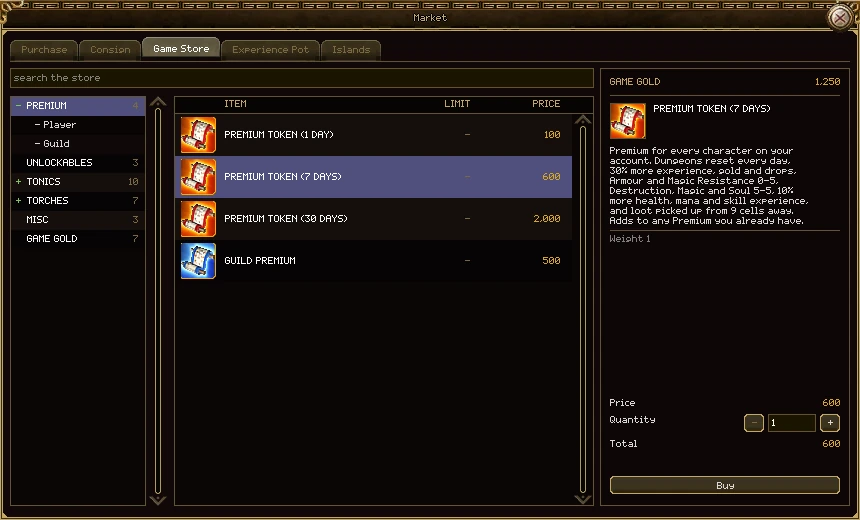
| Part | What it does |
|---|---|
| Search the store | Finds entries in every category as you type. |
| The categories | Click one to see what's in it. Some open into groups. |
| The list | Each entry, its limit (how many your account may ever buy, or a dash for no limit) and its price in Game Gold. |
| Game Gold | What your account has to spend. |
| The picked entry | Its picture, name and what it does. |
| Quantity | How many to buy, up to 99 at once. |
| Total and Buy | What it will cost, and the button. Red text says when you can't afford it or have reached the limit. |
What's on sale
| Category | Items |
|---|---|
| Premium | Premium Tokens for 1, 7 and 30 days (100, 600 and 2,000), and Guild Premium (500) |
| Unlockables | Bag Extension, Additional Vault and Pet Cage Extension (100 each) |
| Tonics | Experience, stats and fortune tonics. A [T] tonic lasts a day of play; a [P] one is permanent. |
| Torches | The Bright Torch and the Marks. A burning torch wears out while worn outside a town; a 7-day Mark lasts seven days from the first time you wear it. |
| Misc | Scrolls of Town Portal and Random Teleport, and Pet Revival |
| Game Gold | Game Gold notes from 10 to 10,000, each costing its face value |
- Everything in the store is an ordinary item. You can trade it, post it or sell it on the market, and use it when you like.
- Anything that doesn't fit in your bag is posted to you from the Game Store.
- Using a Game Gold note puts that much Game Gold on the account of whoever uses it. That is how Game Gold changes hands between players.
Game Gold can't be bought yet, and the prices may change before it can.
Your account has a pot of experience that fills while you play. Spend it on scrolls any of your characters can read, trade or sell. Open it from Experience Pot on the menu (N).
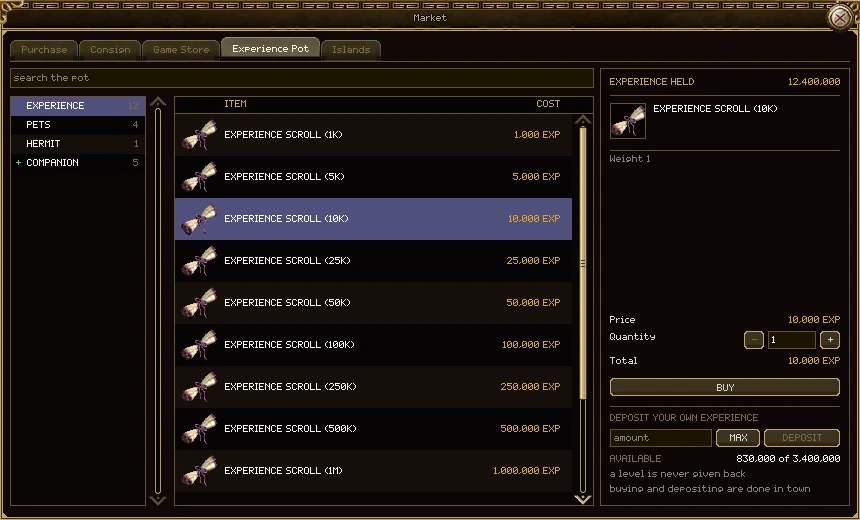
| Part | What it does |
|---|---|
| The shelves | Experience scrolls from 1K to 50M; Pets, scrolls for a wizard's pets; Hermit, the Hermit Point; and Companion, the Elixirs of Regret that reroll a companion's milestones. |
| Experience held | What your account's pot holds. |
| The picked scroll | Its price in experience, a quantity and the total. |
| Buy | Takes the total from the pot and puts the scrolls in your bag. |
| Deposit your own experience | Type an amount, or press MAX, and press Deposit to move this character's experience into the pot. |
| Available | How much you could deposit: the experience you have towards your next level. |
How it fills
- Every kill and quest puts a tenth of the experience you earn into the pot, on top. Your own experience isn't touched.
- Deleting a character puts everything it ever earned into the pot.
- You can deposit your own experience towards your next level. A level is never given back: a level 40 with 1,000,000 towards 41 can deposit up to 1,000,000 and stays level 40.
The rules
- Buying and depositing are done in town.
- A scroll costs exactly what it holds: a 10K scroll costs 10,000 from the pot.
- Up to 100 scrolls at once, and only as many as your bag has room for.
- Experience from a scroll is exactly what it says: no rates or bonuses are added to it.
Islands guilds are selling, at a fixed price or at auction. A guild buys or bids out of its purse, by a member whose rank may buy islands.
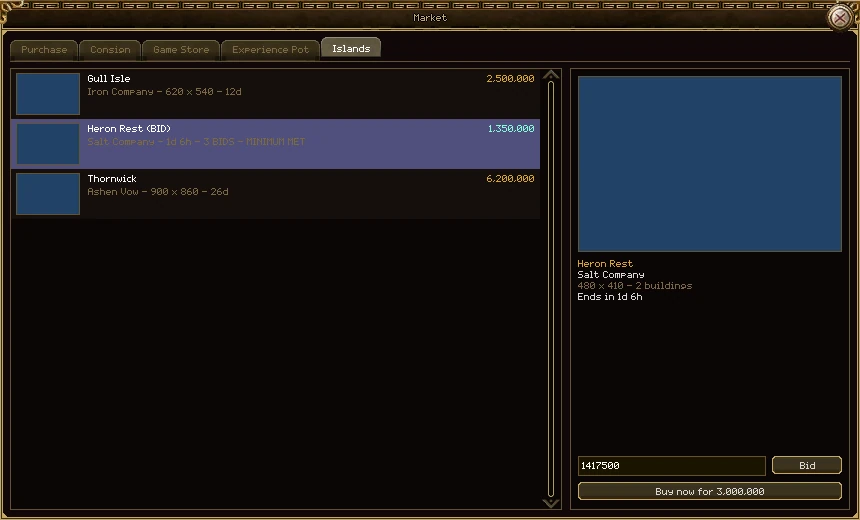
Buying, bidding and selling islands are in Islands.
Press , to open your mailbox. Letters wait for you while you are offline, and they never expire. Market takings, refunds and store deliveries all come this way.
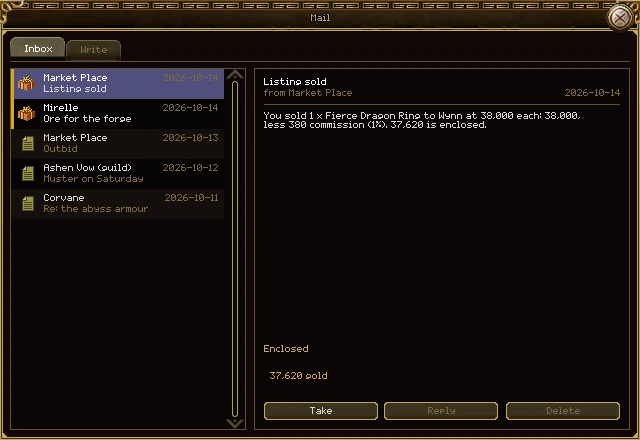
| Part | What it does |
|---|---|
| The letters | Who it is from, the date and the subject. The envelope shows whether you have read it; a parcel means there is still something in it. Unread letters are brighter. |
| The letter | The subject, the sender, the date and what it says. Opening it marks it read. |
| Enclosed | The items and gold it carries. Once taken it says so, greyed. |
| Take | Puts everything in the letter into your bag and purse. |
| Reply | Starts a letter back to the sender, with the subject filled in. Only for letters from players. |
| Delete | Throws the letter away. Grey until you have taken what's in it. |
- Your mailbox holds 50 letters. When it is full, other players can't write to you.
- If your bag can't hold everything you take, the rest lands at your feet.
- Letters from your guild are marked (guild). A guild invitation comes as a letter with an Accept button (see Guilds).
Press . to write a letter, or choose the Write tab. You can write to any character by name, online or not.
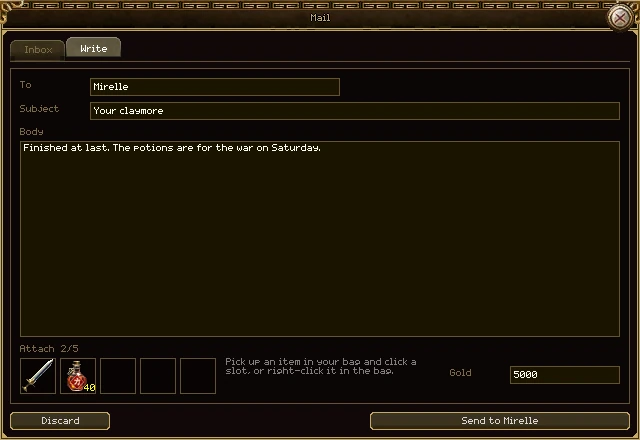
| Part | What it does |
|---|---|
| To | The character's name. |
| Subject | Up to 60 characters. |
| Body | Up to 500 characters. |
| Attach | Up to 5 items. Right-click an item in your bag to attach it, or pick it up and click a slot. Click an attached item to take it off. Items stay in your bag until you send. |
| Gold | Gold to send with it. |
| Discard | Throws the draft away. |
| Send | Sends it. The button says who to, or why it can't be sent yet. |
- Sending is free.
- You can't post to yourself. Your storage is shared by every character on your account: use it to move things between them.
- Only items that can be traded can be posted. Worn and locked items stay where they are.
- If the name doesn't exist or their mailbox is full, nothing leaves your bag.