Every creature you keep is in one window, the menagerie, with three tabs across its top: Companions, Mounts and Pets.
| To open it on | Press |
|---|---|
| Companions | U, or Menagerie on the menu (N) |
| Mounts | Ctrl+M |
| Pets | The pet count on the bottom panel. The Pets tab has no key of its own until you give it one in the key settings. |
Pressing the key for the tab that is already showing closes the window. Each tab works the same way: a list down the left, and the one you are looking at on the right.
Clicking a row in any of the three lists only shows you that animal. Nothing changes until you press a button: Set Default picks the one your key calls, and Summon or Ride uses the one you are looking at, once.
A companion follows you about and picks up your loot. It never fights and nothing can attack it. Press U to see every companion your account owns. Ctrl+U calls your default one out, and pressing it again sends it home.
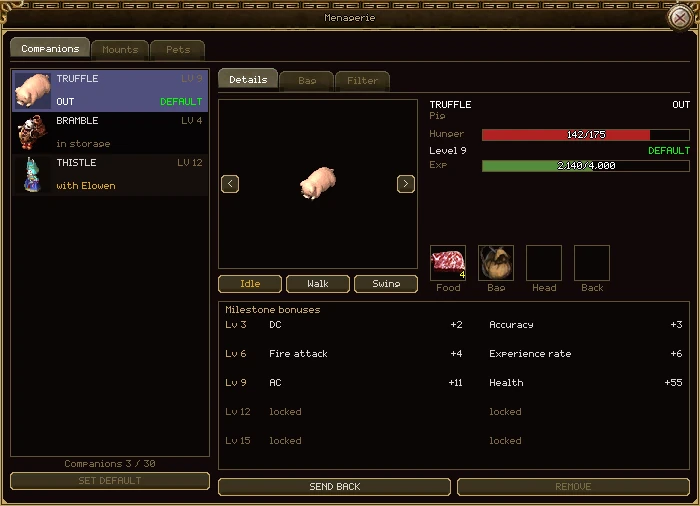
| Part | What it does |
|---|---|
| The list | Every companion on your account: its name, level and where it is. Out is beside you, in storage is resting, and with a name means another of your characters has it out. Default marks the one your summon key calls. |
| Companions 3 / 30 | How many you own against the most an account may keep. It turns orange when you are full, and the next companion item will be refused. |
| Set Default | Makes the companion you are looking at the one Ctrl+U calls. |
| The preview | The animal itself. The arrows turn it; Idle, Walk and Swing play its moves. |
| Hunger | How fed it is, out of the most it can eat at its level. At nought the bar says starving. |
| Level and Exp | Its level, from 1 to 15, and how far it is through this one. |
| Food, Bag, Head, Back | The four things it wears. Pick up a companion item from your bag and click any of the four: it goes in the slot that fits it. Click a filled slot to take the item back. Only the companion that is out can be dressed. |
| Milestone bonuses | What it gives you, two bonuses at each of levels 3, 6, 9, 12 and 15. A level it hasn't reached says locked. While it is starving every line goes grey, because it gives you nothing. |
| Summon / Send back | Calls out the companion you are looking at, once, without making it the default. On the one that is out it says Send back. |
| Remove | Turns the companion back into its item. Press it twice: the first press warns you that its level and bonuses will be lost. |
Rules worth knowing
- Companions belong to your account. Any of your characters can call any of them.
- One companion out at a time. Summoning another sends the first home.
- Summoning one that another of your characters has out takes it from them, bag, gear and all. If that character is online, they are told where it went.
- Log out with a companion beside you and it is beside you again when you come back.
- Remove only works on an empty companion: nothing in its bag and nothing worn. You also need a free slot in your bag for its item, which goes back to level 1 if you adopt it again.
What the companion is carrying. It is the only bag in the game with its own weight limit, and it grows as the companion levels.
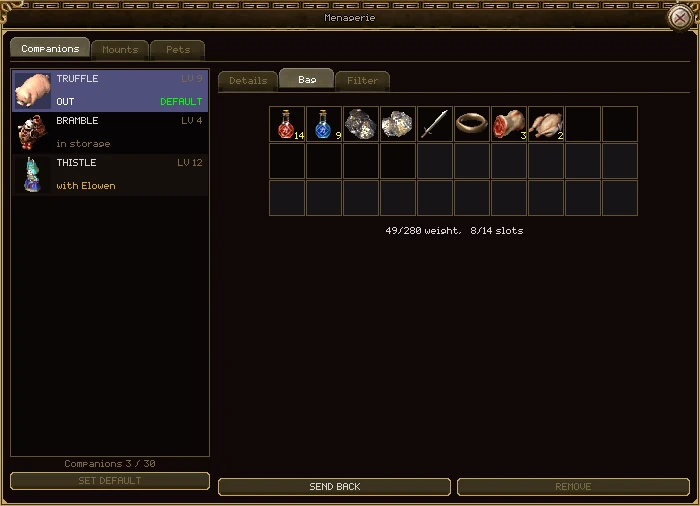
| Part | What it does |
|---|---|
| The grid | Thirty cells, the most any companion can ever have. It can use only as many as its slots line says; it grows into the rest. |
| Weight and slots | What it carries against what it can carry, and how many of its slots are full. A companion too young to have a slot says so here. |
Moving things in and out
- Click an item in the companion's bag to take it into yours.
- With the Bag tab showing, right-click an item in your own bag to hand it over, or pick it up and click a cell here.
- Only the companion that is out can be given or asked for anything. A stored one's bag is shown but can't be touched.
How big the bag is
| Level | 1 | 3 | 6 | 9 | 12 | 15 |
|---|---|---|---|---|---|---|
| Slots | 0 | 2 | 6 | 9 | 12 | 12 |
| Weight | 50 | 90 | 150 | 230 | 350 | 800 |
A worn bag adds to both: the Basic Worn Bag, sold by the Companion Manager, adds 5 slots and 50 weight. Head and back pieces can add weight too, and some milestone bonuses add to the companion's weight limit.
What the companion is allowed to pick up. Without a filter it fetches everything it can carry, and a big bag soon fills with things you don't want.
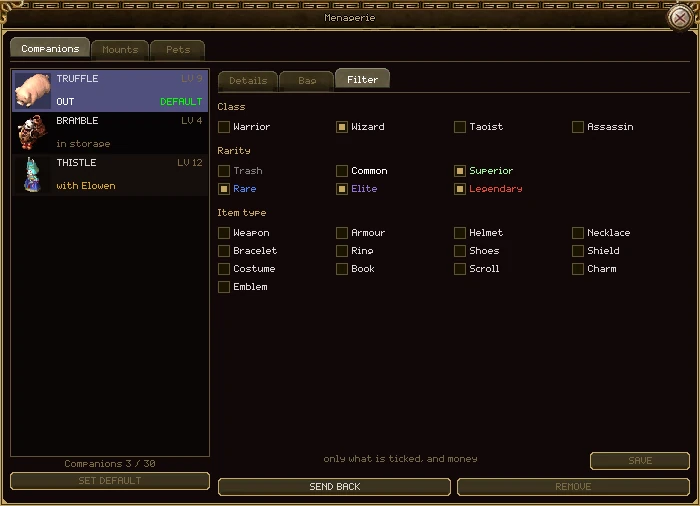
| Part | What it does |
|---|---|
| Class | Gear for the classes you tick. Anything every class can use is fetched whatever you tick here. |
| Rarity | The qualities you tick, each written in its own colour (see Items and the bag). |
| Item type | The kinds of item you tick: weapons, armour, rings, books, charms and so on. |
| The note | Says what the ticks mean together: everything, or only what is ticked, and money. |
| Save | Nothing changes until you press it. It lights up once your ticks differ from the saved ones. |
- A group with nothing ticked doesn't filter at all. Ticking nothing anywhere fetches everything.
- Ticking two classes fetches gear for either of them.
- Gold is always fetched, whatever you tick, as long as your purse has room for it.
- A companion another of your characters has out can't have its filter changed.
Every companion starts as an item, one for each kind of animal. Using the item adopts it, and you can do that anywhere.
- Get a companion item. Feniwic in Bichon Province sells the Pig Companion for 10,000 gold. The pig is the only kind on sale at the moment.
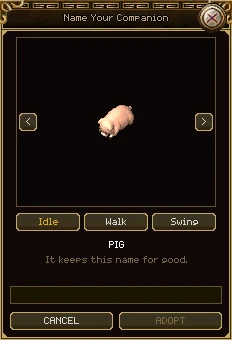
- Right-click it in your bag. The naming window opens, with the animal turning in it.
- Type a name of 2 to 20 letters, digits and spaces. Choose well: it keeps the name for good.
- Press Adopt. The item is used up and the companion joins your collection. Your first one becomes your default.
- Press Ctrl+U to call it out.
- An account can keep up to 30 companions. A companion item used when you are full is refused, and stays in your bag.
- A refused adoption (a bad name, a full collection) costs nothing.
- The Companion Manager in Bichon Town, and the managers in other towns, sell companion food and the Basic Worn Bag, and can open the Companions tab for you. They won't serve a player killer.
A companion earns experience every minute it is out, and gets hungrier every minute too. Its bonuses are the reason to keep it fed: a starving companion gives you nothing.
Hunger and food
- Hunger drops by 1 every minute the companion is out. A level 15 companion standing in a town doesn't get hungry.
- When hunger reaches nought, it eats one item from its Food slot. Put a stack there and it looks after itself.
- It eats only when it is empty, so one piece of food fills it to that food's value, never more than its level's most.
- When there is nothing left to eat you are told once, and its bonuses (and those of anything it wears) stop until it is fed.
| Food | Fills |
|---|---|
| Fresh Meat | 175 |
| Green Apple, Chestnut Rice Ball, Meat Dumpling | 6 |
Levels
- Companions go up to level 15. Each one is worth more experience than the last: 100 for level 2, about 11,600 for each of the last five.
- A companion earns 1 experience a minute. Your account's best other companion speeds it up: a new one earns as many a minute as that companion's level, so a second companion catches up quickly.
- The first companion you raise takes the longest: about 1,160 hours out to reach level 15.
- Its most hunger rises with its level, from 100 at level 1 to 500 at level 15.
Milestone bonuses
At levels 3, 6, 9, 12 and 15 the companion rolls two bonuses and keeps them for good: one for fighting and one for everything else. A roll picks one stat from a line, and the numbers grow with the milestone.
| Fighting (one of) | At level 3 | At level 15 |
|---|---|---|
| DC, MC or SC | +1 to +3 | +5 to +15 |
| AC or MR | +1 to +5 | +3 to +22 |
| One element's attack | +1 to +3 | +3 to +10 |
| One element's resistance | +1 to +3 | +4 to +12 |
| Everything else (one of) | At level 3 | At level 15 |
|---|---|---|
| Accuracy or Agility | +1 to +5 | +5 to +15 |
| Health or Mana | +5 to +30 | +30 to +200 |
| Experience from kills | +1% to +5% | +5% to +20% |
| The companion's carry weight | +5 to +20 | +5 to +20 |
| Your own carry weight | +10 to +20 | +15 to +20 |
Rolling again
An Elixir of Regret rolls a milestone again. There is one for each milestone level, in three kinds: (Power) rolls the fighting bonus, (Fortune) the other one, and the plain elixir both. They are on the Companion shelf of the Experience Pot.
- Your companion must be out, and must already have reached that milestone. Otherwise the elixir is refused and stays in your bag.
A wizard keeps the monsters they tame. Every one is listed on the Pets tab of the menagerie, to call out, put in its cage, name and set to fight the way you want.
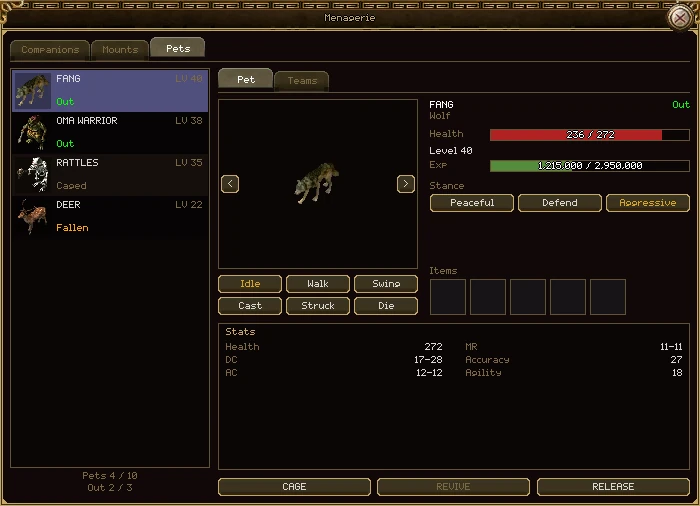
| Part | What it does |
|---|---|
| The list | Every pet this wizard keeps: its name (or its kind, until you name it), level, and whether it is Out, Caged or Fallen. |
| Pets 4 / 10 | How many pets you keep against how many your account allows. |
| Out 2 / 3 | How many are beside you against how many may be. |
| The preview | The pet itself, with every move its kind has: Idle, Walk and Swing, and Cast, Struck and Die where it has them. |
| Name | Shown until the pet has a name. It opens a box: 2 to 20 letters, digits and spaces. A pet is named once and keeps it. |
| Health, Level, Exp | Its health now, its level and how far through it. At cap means it has reached your level and can't go higher until you do. |
| Stance | Peaceful never fights, not even back. Defend attacks only what is attacking you or one of your pets. Aggressive attacks anything hostile it can see, and whatever you attack. A new pet starts on Defend. |
| Items | Five slots for pet items. Nothing goes in them yet. |
| Stats | Its health, DC, AC, MR, accuracy and agility, and MC or SC if it has any. |
| Summon / Cage | Calls the pet out beside you, or puts it back in its cage. Grey for a fallen pet, or when you already have as many out as you may. |
| Revive | For a fallen pet: uses a Pet Revival from your bag. |
| Release | Lets the pet go for good. Press it twice. |
Every class can open the tab, but only a wizard has pets to put in it. The pet's stance only ever narrows your pet mode (Ctrl+A, see Combat, PK and death): with pets told only to move, none of them fights, whatever its stance.
A wizard tames with Electric Shock. A tamed monster is yours for life: it doesn't wander off, it can't be stolen, and it waits in its cage when you log out.
Taming
- Find a living monster no more than 2 levels above you. Bosses, guards and anything that already belongs to somebody can't be tamed.
- Cast Electric Shock on it, again and again. Most casts do nothing or only stun it: its name turns brown while it stands still.
- A cast that fails badly can enrage it instead: its name turns red and for a while it attacks other monsters as well as you. Now and then the shock simply kills it.
- When it takes, the monster is yours. It comes out beside you if you have room, or goes straight into its cage.
Raising Electric Shock makes it take hold more often. You need a free slot in your roster to tame anything.
The numbers
| What | How much |
|---|---|
| Pets kept | 10 to start. Each Pet Cage Extension from the game store adds 5, for every character on the account, up to 30. |
| Out at once | 3 |
| Highest level | 80, and never above your own level |
| Level when tamed | Its own level, or yours if that is lower |
| Body after death | 5 minutes |
| Health after a Pet Revival | 20%, in its cage |
| Health back, out of a fight | 5% every 3 seconds, out or caged |
How pets level
- A pet needs the same experience for a level as a player does.
- Every kill that pays you also pays every pet you have out, alive and in sight of the body, the same amount again. It isn't taken from your share.
- A pet below your level earns two and a half times that, so a pet tamed low soon catches up.
- A pet at your level still earns, but stops one point short of its next level. It goes up the moment you do.
- Pet Experience Scrolls, on the Pets shelf of the Experience Pot, share their experience evenly between the pets you have out.
Out and about
- Summon, Cage, Revive, Release and teams all work anywhere, in town or out of it.
- A pet keeps its health in the cage, and heals there over time. Caging a pet that is about to die saves it.
- A pet more than 24 cells away, or stuck behind something, jumps back to you once it is out of a fight, as long as your pet mode lets it move.
- Wild monsters attack pets, even peaceful ones.
- When you log out or die, your pets go back to their cages unharmed, and the ones that were out come out again when you return.
When a pet falls
- Its body lies where it fell for 5 minutes. A Taoist in your group or guild can bring it back with Resurrection, right there.
- After that it is Fallen: it can't be summoned or join a team until you use a Pet Revival on it from the Pet tab (the game store sells them).
- A pet's death pays nobody and drops nothing.
A released pet goes back to the wild beside you as an ordinary monster with 1 health. It pays nothing if killed, and nobody can ever tame it again, you included. Pets can't be traded, sold or posted.
A team is a named line-up of pets you can call out with one button. Use one for hunting and another for guarding, and swap between them in a second.
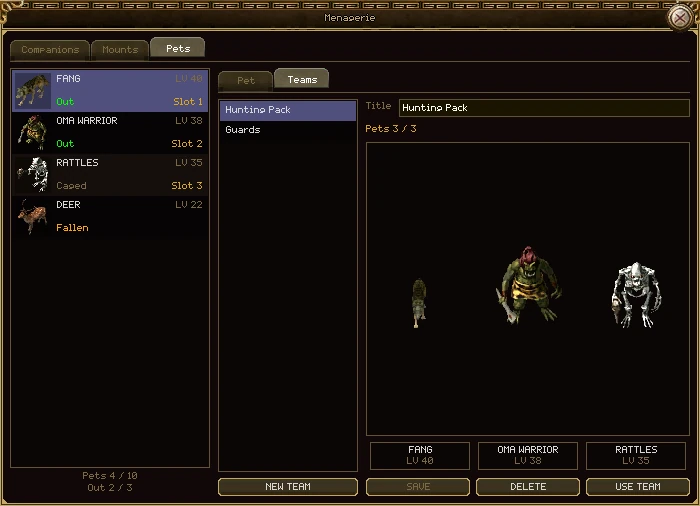
| Part | What it does |
|---|---|
| The teams | Every team you have saved. Click one to edit it. |
| New team | Starts an empty team. You can keep up to 5. |
| Title | The team's name: 2 to 20 letters, digits and spaces. |
| Pets 3 / 3 | How many are in the team against how many may be out at once. |
| The line-up | The team standing in a row, one column per slot. Drag a pet from the list on the left onto a column to put it there. Drag one column onto another to swap them; drag a pet out of the box, or right-click it, to take it out of the team. |
| Slot | On the list on the left, which slot of this team each pet holds. |
| Save | Keeps your changes. Nothing is saved until you press it. |
| Delete | Throws the team away. The pets are untouched. |
| Use team | Cages every pet that isn't in the team, and calls out the rest of it. |
- A pet can be in any number of teams. Releasing a pet takes it out of all of them.
- Use team skips a fallen pet and tells you which. Pets come out in slot order.
Horses belong to your account. M gets you on your default horse and off again; Ctrl+M opens the stable, the Mounts tab of the menagerie.
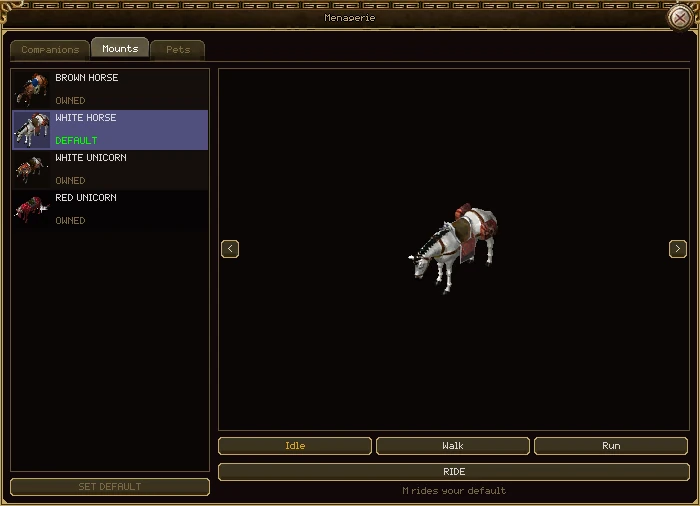
| Part | What it does |
|---|---|
| The list | The horses your account owns. Under each: Riding, Default or Owned, or the level you need before you can ride it. |
| Set Default | Makes the horse you are looking at the one M rides. |
| The preview | The horse, with the same pictures you see in the world. The arrows turn it; Idle, Walk and Run show it moving. |
| Ride / Get off | Gets you on the horse you are looking at, once, without changing your default. On the horse you are riding it gets you off. |
| The key line | Which key rides your default. It follows the key settings if you change it. |
Getting a horse
- Visit Henry's stables in Bichon Province. He sells all 21 horses for 10,000 gold each.
- Right-click the horse in your bag. It goes into your stable, for every character on the account. Your first horse becomes your default.
- Press M to ride. You must be level 15.
The 21 are the Brown, White, Red and Black Horses, the White and Red Unicorns, the Blue Horse, the Blue Dragon, the Dark Horse, and Gold, Iron and Silver Horses in brown, white, red and black. The Blue Dragon and the Dark Horse glow. Every horse is equal: the look is the only difference. A horse you already own is refused and the item kept.
On horseback
- A run is three cells instead of two.
- Riding adds 50 to the weight you can carry.
- You can't swing a weapon from the saddle, and only riding skills work while you ride.
- You can't ride while dead or on a map that doesn't allow horses. Dying or being pushed knocks you off.
- There is no horse armour. Barding you still have can be sold, but it does nothing.