The launcher installs the game, keeps it up to date, logs you in and starts the game with you already signed in. Download it from the front page: there is one for Windows, Linux and macOS. It never asks for administrator rights.
The first time
- Open the launcher. It asks Where should the game be installed? and suggests a folder called LegendaryMir in your own user folder. It says how much space the game needs and how much is free; Change… picks another folder.
- Press Install. A drive without enough room is refused before anything downloads.
- Watch the bar along the bottom: how much has arrived, the speed and how many files are left. Pause and Resume are beside it. Closing the launcher keeps what has arrived, and the download carries on from there next time.
- Log in while it downloads. Everything works except Play, which waits until the game is complete.
Logging in
| Part | What it does |
|---|---|
| Email, Password | Your account. The same account works on the website, in the launcher and in the game. |
| Remember me | Signs you in by itself next time. Your password is never kept; the launcher keeps a sign-in token in your computer's secure store. On Linux this needs a keyring such as GNOME Keyring or KWallet, and the box is greyed out without one. |
| Create an account | Makes a new account from the launcher (see Making an account). |
| Server dot | Server online or Server offline. It is checked once a minute while the launcher is open. |
Your characters
| Part | What it does |
|---|---|
| The list | Each character's name, class and level. The one you pick stands in the hall beside the list. |
| Play | Starts the game and takes the chosen character straight into the world. |
| Always play name | Next time the launcher skips the list and plays that character. Undo it in the launcher's Settings with Forget. |
| New character | The creation screen, the same choices as in the game. An account with no characters goes straight there. |
| Choose in game | Starts the game on its own character list instead. |
| Sign out | Back to the login form. |
You can make characters while the game is still downloading, which is a good way to claim a name early. Deleting a character is only done in the game.
The launcher's Settings
- Game location and Move…: moves the whole game to another folder or drive. Choose an empty folder.
- Language: the launcher's language, or Same as my computer.
- When the game starts: minimise the launcher (the default), close it, or keep it open.
- Play as soon as the launcher opens: needs Remember me and a character set to Always play. Together they are a one-click (or no-click) way into the world.
- Repair game: checks every game file and replaces any that are damaged or missing.
- Open logs folder: the launcher's log and the last ten game logs, for a bug report.
Updates
The launcher looks for an update when it opens and every 30 minutes while it is idle, and downloads only the parts that changed. Every update is signed, and one that fails the check is refused rather than installed. Your settings, window layout, key bindings and addons are never overwritten. An update never installs under a running game: it waits until you close the last one (An update will install when you close the game).
If the game closes by itself in its first few seconds, the launcher says The game closed unexpectedly and offers Open log and Repair.
More than one character at once
Each Play starts its own game window, so you can run several of your characters side by side without typing the password again. A character that is already playing says Playing… on its row. A character can only be in the world once: pressing Play on one that is already in asks first, and the second copy is turned away unless the first has gone back to its character list.
An account is an email address and a password. Make it in any of three places; it is the same account in all of them.
- On this website: Make an account.
- In the launcher: Create an account under the login form.
- In the game: New Account on the login window.
| Rule | What it means |
|---|---|
| Must not already have an account. Nothing is sent to it, so there is no link to wait for. | |
| Password | At least 8 characters, typed twice. The form says Those are not the same as soon as the two differ. |
| Characters | Up to 4 on one account. |
Nobody from the game will ever ask for it. The launcher's Remember me keeps a sign-in token, never the password, and the game itself never stores it.
Anyone can make an account and characters. Taking a character into the world needs an invite code, used once on the website.
- Get a code from someone who plays. Codes are twelve letters and digits; dashes and capitals don't matter.
- Sign in on the website and open your account. An account that can't play yet sees Have an invite code? there, and the top bar says Enter an invite code.
- Type the code and press Use this code. Done means every character on the account can now enter the world.
Until then, the launcher and the game let you log in and make characters, but entering the world says the account needs an invite code and to enter one on the website.
Codes of your own
Players are sometimes given codes to pass on. When you hold some, the top bar shows Invites with a count, and Your invite codes lists each one with a Copy button. A code you've given away shows Used on and the date, but never who used it. You can't use a code you hold yourself, and an account can only ever use one code.
You get 10 tries an hour. A code that is used, cancelled or out of date gets the same answer as a mistyped one: check it with the person who gave it to you.
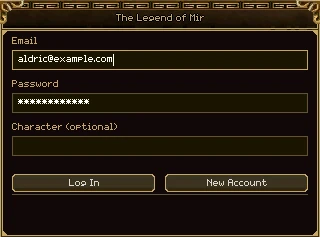
If you start the game without the launcher, or sign out back to the beginning, the game opens on its own login window over the painting of the palace.
| Part | What it does |
|---|---|
| Email, Password | Your account. The password is shown as stars. |
| Character (optional) | Leave it empty to go to your character list. Type a character's name and Log In takes that character straight into the world. |
| Log In | Logs in. Enter does the same. |
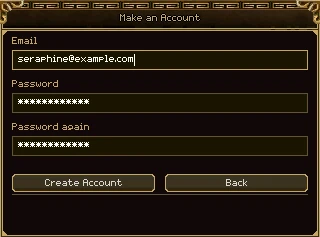
| New Account | The Make an Account form: Email, Password and Password again, then Create Account. A new account is logged in at once and goes to character creation. Back or Escape returns. |
| The line at the foot | What the game is doing (Logging in...) or why it couldn't (that email address and password do not match). |
| Exit Game | In the bottom right corner of the screen. Closes the game. |
Tab moves to the next box. The caret starts in the email box, so you can type at once.
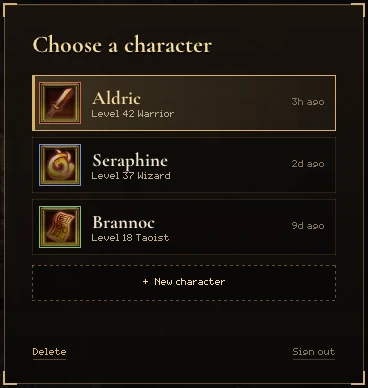
Once you're logged in, the game shows your characters. The one you pick stands in the hall with their name over them, and the card of characters is on the right.
| Part | What it does |
|---|---|
| A row | A character: class picture, name, level and class, and when they last played. Click to choose them; double-click to play. |
| + New character | Opens the creation card. It's there while the account has room (4 characters). |
| Delete | Deletes the chosen character, after a question (below). |
| Sign out | Back to the login window. |
| PLAY | In the bar along the bottom. Takes the chosen character into the world. |
| Exit Game, Settings | At the two ends of the bottom bar. Settings opens the game's settings window (see Settings and addons). |
The list opens on whoever played last. ↑ and ↓ move through it and Enter plays.
Deleting a character
- Choose the character and click Delete.
- The game asks Delete name for ever? The Yes button stays dead for 5 seconds while you read the name.
- Press Yes, or No (or Escape) to keep them.
A character in a guild can't be deleted: the game says so, and you need to leave the guild first. A deleted character's name stays taken.
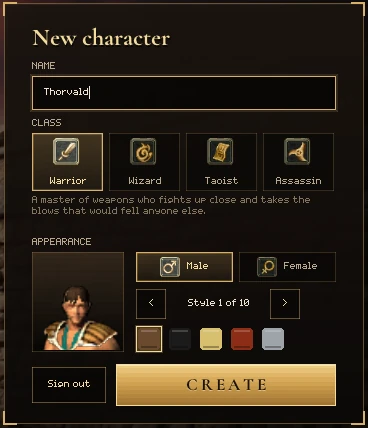
Press + New character on the list. The hall becomes a courtyard, and whoever you're making stands in it and changes as you choose.
| Part | What it does |
|---|---|
| Name | The character's name (rules below). |
| Class | Four tiles. The line under them says what the chosen class is like. |
| Male, Female | The character's gender. |
| Style n of count | The hair style, with < and >. How many styles there are depends on the class and gender. |
| The five colours | Hair colour: brown, black, fair, red or grey. |
| CREATE | Makes the character (or press Enter). It lights up once there is a name. |
| Back | Back to the list (or Escape). On an account with no characters yet this button is Sign out instead. |
The four classes
| Class | In a sentence |
|---|---|
| Warrior | A master of weapons who fights up close and takes the blows that would fell anyone else. |
| Wizard | Commands fire, ice and lightning from a distance, and is fragile when anything reaches them. |
| Taoist | Heals friends, calls up spirit beasts to fight beside them, and wears foes down with poison and talismans. |
| Assassin | Strikes fast from the shadows, trading armour for speed and blows that land where it hurts. |
Names
- 3 to 16 characters long.
- Letters and digits only: no spaces, no punctuation.
- It can't start with a digit.
- All the letters must come from one alphabet. Mixing, say, Latin and Cyrillic letters in one name is refused.
- Nobody else may have it already, including a deleted character.
If a name is refused, the card says why (somebody already has that name, that name is too short) just above the buttons.
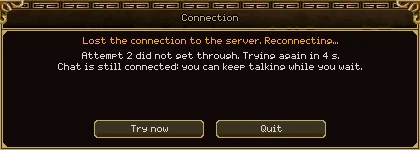
If the connection to the world drops, the game doesn't throw you out. The world stays on screen, dimmed, a window called Connection says what is happening, and you are put back where you were as soon as the server answers.
When the connection drops
- The game tries again by itself: after a second, then waiting a little longer each time, up to about 15 seconds between tries, for as long as it takes. The window shows which attempt it's on and the countdown to the next.
- Try now skips the wait. Quit closes the game straight away.
- If the server is restarting, the window says The server is restarting. You will be reconnected automatically.
- Chat often stays up when the world doesn't. While the window says Chat is still connected you can keep talking to your group, guild and friends.
- When you're back, everything on screen is fresh from the server: monsters, other players and open trades from before the drop are gone. Your chat history stays.
When it won't come back by itself
| The window says | What happens |
|---|---|
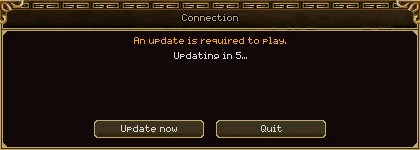
| An update is required to play. | The server needs a newer game. It counts down 5 seconds (or press Update now), hands over to the launcher, which updates and puts you back in with the same character. A game started without the launcher says Please update the game through the launcher instead. |
| Your session has ended. | The launcher signs you back in, by itself if you ticked Remember me. |
| This character was logged in from somewhere else. | The same character entered the world from another game window or computer. Only Quit is offered. |
| You were removed from the server. / This account has been banned. | Only Quit is offered. |
Idle sessions
Logging in starts a session. While you play it never runs out, however long you play. A game that closes without saying goodbye (a crash, a pulled cable) has its session end 10 minutes later. Quitting properly ends it at once.
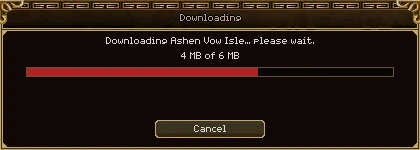
Some maps are made while the game is running: a guild's island, for one, is made the moment it is bought. The first time you travel to one, your game fetches its files first, and this window shows it.
| Part | What it does |
|---|---|
| The first line | What is being fetched, by name. |
| The bar | How much has arrived, out of how much. |
| Cancel | Stops the download, and with it the trip. |
| Try again | Only after a failure. The window then says why: the download server didn't answer, what arrived wasn't the right file (it is never used), or the file couldn't be saved (check the disk has room). |
It opens and closes by itself, and Escape doesn't close it. Members of a guild usually never see it: their game fetches the guild's islands in the background ahead of time. See Islands.
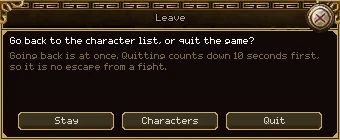
Open the menu (N) and press Leave. The Leave window offers two ways out.
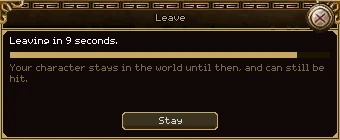
| Button | What it does |
|---|---|
| Stay | Closes the window. You carry on playing. |
| Characters | Back to your character list at once. Nothing is closed, so you can pick another
character straight away. Typing /logout (or /char) in chat does the same. |
| Quit | Closes the game after a 10 second countdown. Your character stays in the world for those 10 seconds and can still be hit, so quitting is no escape from a fight. Stay stops the countdown, and so does closing the window. |
If the world has stopped answering, Quit doesn't count down: there is no fight to escape. Closing the game window itself also quits.