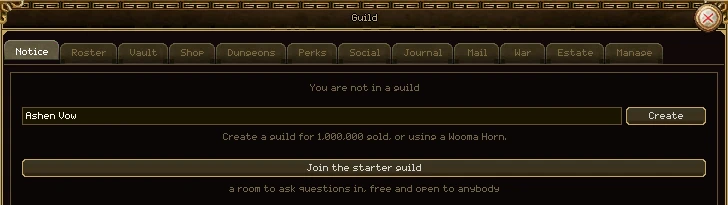
Press G. If you're not in a guild, the window offers two ways in: found your own, or walk into the Starter Guild. Any other guild has to invite you.
Founding a guild
- Press G and type the guild's name in the box. A name is 3 to 24 characters, and no two guilds may share one, whatever the capitals.
- Press Create. Founding costs 1,000,000 gold from your own purse. If you carry a Horn of Uma King, the horn is used up instead and the gold stays yours.
- You are the guild's leader. A new guild has three ranks (Leader, Officer and Member), room for 10 members, one vault shelf and an empty purse.
The Starter Guild
Press Join the starter guild to walk straight in, no invitation needed. It's a room to ask questions in: guild chat is where new players find out how things work. Nobody leads it, so nobody can invite, remove, spend or change anything; everyone in it is a plain member. It fills up like any other guild, and the button says so when it's full. Leave it whenever you're ready to join a real guild.
Being invited
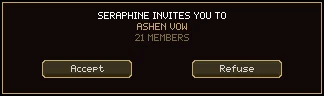
- Face to face. A member whose rank may invite targets you and presses Invite target on the Roster tab, or types /ginvite and your name (or /ginv) from anywhere on the server. You get the box above: Accept or Refuse. Party members can also invite you from the group window's menu.
- By letter. A guild can write to you with an invitation in it. It works once, only for you, within 7 days. Open the letter in your mailbox and accept it there.
- Joining is checked at the moment you accept. If the guild has filled up meanwhile, or you've joined another, you're told so.
- New members always start at the guild's lowest rank.
Each of your characters can be in a different guild, or none. Joining one with an alt doesn't move your main.
Press G or the guild button on the menu. It's the biggest window in the game, with twelve tabs along the top and the same header on every one of them.
| Part | What it does |
|---|---|
| Guild name | Top left, on every tab. |
| Experience, drop rate, gold rate | What belonging to this guild adds to every member's rates right now, from the perk tree. Green when above nothing. |
| Guild level and bar | The guild's own level, and how far it is to the next. Hover the bar for the exact figures. |
| Members and gold | How many members against how many places, and what's in the guild's purse. The line turns gold when every place is taken. |
| Build | Only on your guild's own land or island, for a rank that may build: puts buildings down. See Islands. |
| Tab | What it's for |
|---|---|
| Notice | The guild's book of pages: news, rules, raid times. |
| Roster | Every member, sorted and filtered, and what you can do to each. |
| Vault | Ten shelves of shared storage, each with its own rules. |
| Shop | Supplies bought with the guild's purse. |
| Dungeons | The guild's dungeon runs this week. |
| Perks | The guild's level, its perk tree, and Guild Premium. |
| Social | Guild chat, kept so you can read what you missed. |
| Journal | Every coin in and out of the purse, and every vault move. |
| The guild's own mailbox, and letters written as the guild. | |
| War | Wars over land. |
| Estate | The hall, islands and land the guild holds. |
| Manage | The ranks and what each may do. |
Every member sees every tab. What changes with your rank is which buttons work: a button your rank can't use is drawn dimmed, and its tooltip says why.
Start a line with /g to talk to the whole guild. Everything said there is kept on the Social tab.
The first tab. Not one line of text but a small book: up to 20 pages the officers write, with headings, colours, lists, item names and links between the pages.
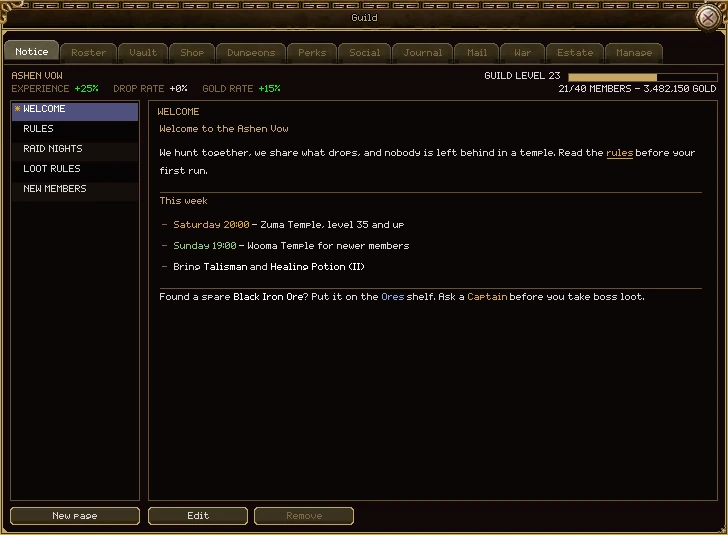
| Part | What it does |
|---|---|
| The page list | Click a title to read that page. The star marks the front page, the one the tab opens on. |
| The page | What the page says. Scroll if it's long. Underlined words are links to another page of the book; item names show the item's tooltip under the pointer. |
| New page | Starts a blank page. Off once the book has 20. |
| Edit | Opens the page you're reading in the editor. |
| Remove | Deletes the page. The front page can't be removed while there are others; make another page the front page first. |
The three buttons appear only for a rank that may write the notice. A guild with no pages yet shows its short one-line notice instead, if it has one.
Writing a page
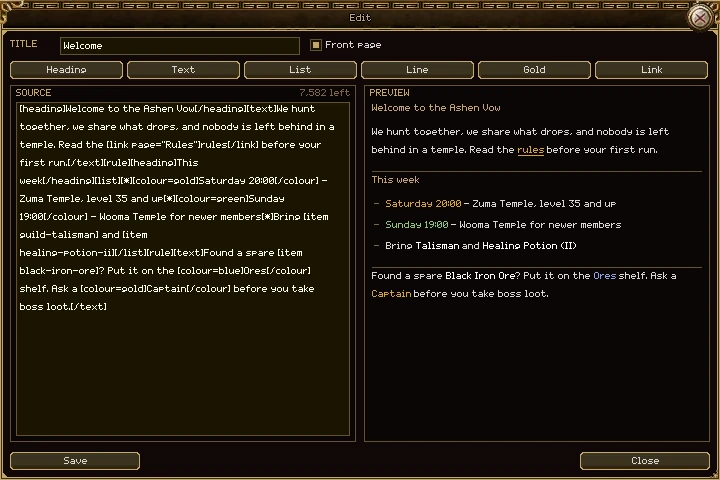
| Part | What it does |
|---|---|
| Title | What the page is called in the list, up to 32 characters. A page can't be saved without one. |
| Front page | Tick it to make this the page the tab opens on. |
| Heading, Text, List, Line, Gold, Link | Each puts its tag in at the cursor. Select some words first and the tag wraps them; with nothing selected it puts in "write here", ready to type over. |
| Source | The page as you write it. Copy, cut, paste and the arrow keys all work. Ctrl+. opens the emoticon picker. |
| "left" | How much more the page can hold. Gold when it's nearly full, red when it's over and Save won't work. A page holds about 8,000 characters, and the whole book about 64,000. |
| Preview | Exactly what members will see. A link to a page that doesn't exist shows as plain words here, so you can fix it. |
| Save, Close | Save publishes the page to the guild at once. Close throws away your changes. |
The tags
| Write | To get |
|---|---|
[heading]This week[/heading] | A heading line in gold. |
[text]...[/text] | A paragraph, wrapped to the page. |
[list][*]one[*]two[/list] | A bulleted list; each [*] starts a bullet. |
[rule] | A line across the page. |
[colour=gold]...[/colour] | Coloured words. The colours are
white, gold, grey, green, red
and blue. |
[link page="Rules"]the rules[/link] | A link to another page of the book,
named by its title, or "home" for the front page. Links only ever go to pages of
your own guild's book. |
[item healing-potion] | An item's name, in its grade's colour, with the item's tooltip under the pointer. The item is named by its id: its English name in lower case, with dashes between the words. Each member sees the name in their own language. |
[icon 6] | An item picture, on a line of its own, by its picture number. |
A tag the game doesn't know is skipped, not shown. Emoticons (:smile: and the rest)
draw as pictures, as they do in chat.
Everyone in the guild, online or not, in a table you can sort and filter.
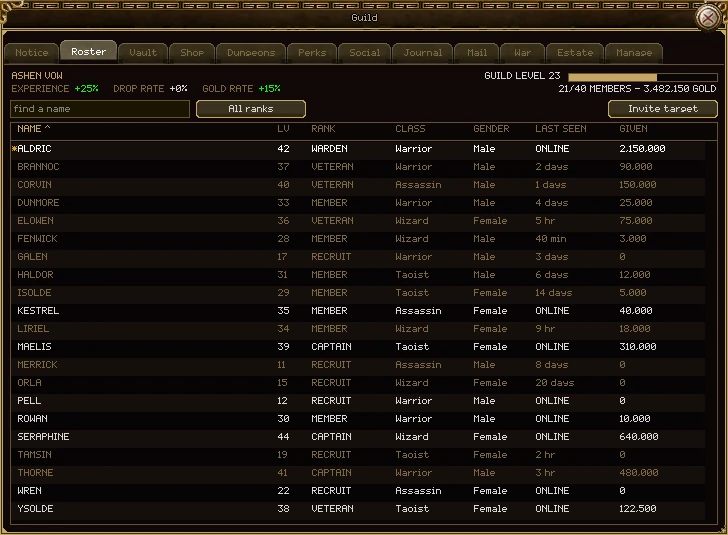
| Part | What it does |
|---|---|
| find a name | Type part of a name to show only the members that match. |
| All ranks | Click to show one rank at a time; each click moves to the next rank, then back to all. When the list is filtered, "SHOWING x OF y" says how many are hidden. |
| Invite target | Invites whoever you have targeted. For anyone out of sight, type /ginvite and their name. Dimmed if your rank may not invite. |
| The headings | Click one to sort by it; click it again to reverse. Numbers sort highest first, names A to Z. |
| Name | A star marks the leader. Your own row is in white. |
| Lv, Rank, Class, Gender | The member's level, guild rank, class and gender. |
| Last seen | ONLINE, or how long ago they last played. |
| Given | How much gold this member has paid into the purse. |
Right-click a member
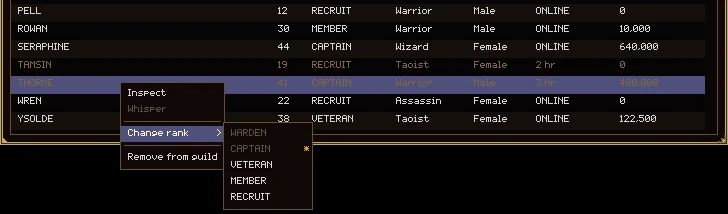
| Menu row | What it does |
|---|---|
| Inspect | Shows what they're wearing, even if they're far away. |
| Whisper | Opens the chat line addressed to them. Only while they're online. |
| Change rank | For a rank that may change ranks. Pick the new rank from the list. You can only move members who are below you, and only to ranks below your own. |
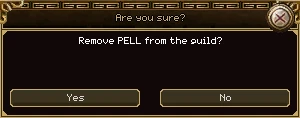
| Remove from guild | For a rank that may remove members, and only for members below your own rank. Asks to confirm. |
| Leave guild | On your own row, in place of Remove. Asks to confirm. |
- Nobody can act on someone of their own rank or above, or promote anyone to their own rank or above. That rule can't be changed by any permission.
- The leader can't leave while anyone else is in the guild, and nobody can be promoted to leader.
- The last member out ends the guild. They have to empty the vault first, or it won't let them go.
Storage the whole guild shares: ten shelves of 150 items. Each shelf has its own name, its own picture, and its own rule about who may put things in and who may take them out.
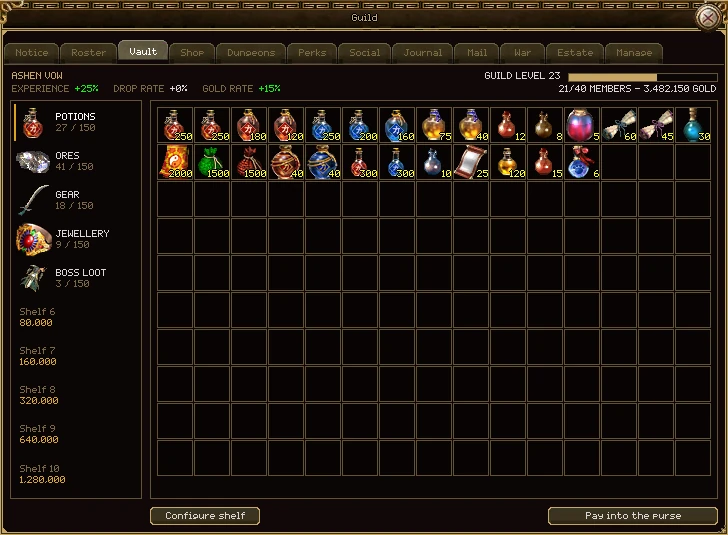
| Part | What it does |
|---|---|
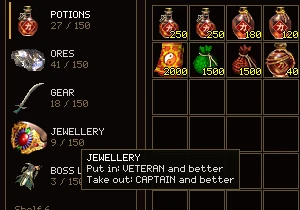
| The shelves | Click one to open it. Each shows its picture, name and how full it is; a shelf not yet bought shows its price. Hover a shelf to see who may put in and who may take out. |
| The grid | What's on the open shelf, fifteen across and ten down. |
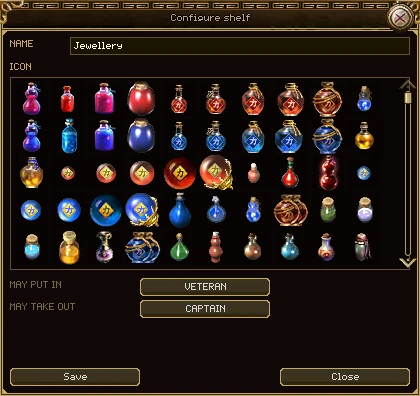
| Configure shelf | Name it, pick its picture and set its two ranks. For a rank that may arrange the vault. |
| Buy this shelf | Appears when a locked shelf is picked. Pays for it from the purse. |
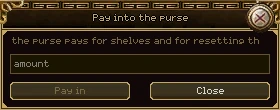
| Pay into the purse | Gives the guild some of your gold. See the purse. |
| The note under the grid | When your rank may only put in, or only take out, or neither, it says so here. |
Putting things in and taking them out
- Right-click an item in your bag (or Shift-click it) while the Vault tab is showing, and it goes onto the shelf you're looking at.
- Right-click an item on the shelf, or Shift-click it, to take it into your bag.
- Or click to pick an item up and click again where it goes. Take off anything you're wearing before you store it.
- With the chat line open, Shift-click links the item in chat instead.
- The vault only works in a town (any safe zone). Anywhere else, every move is refused.
- Every item in and out is written in the journal, with who moved it.
Who may use a shelf
Each shelf has two settings, May put in and May take out. Each is a rank: that rank and every rank above it may do it. Click the button to step through the ranks, or to Anybody. You can't set either above your own rank. A shelf anybody may fill but only officers may empty works as a deposit box.
A new shelf lets anybody put in and lets Officers and above take out. Members who may not touch a shelf can still see what's on it.
Buying shelves
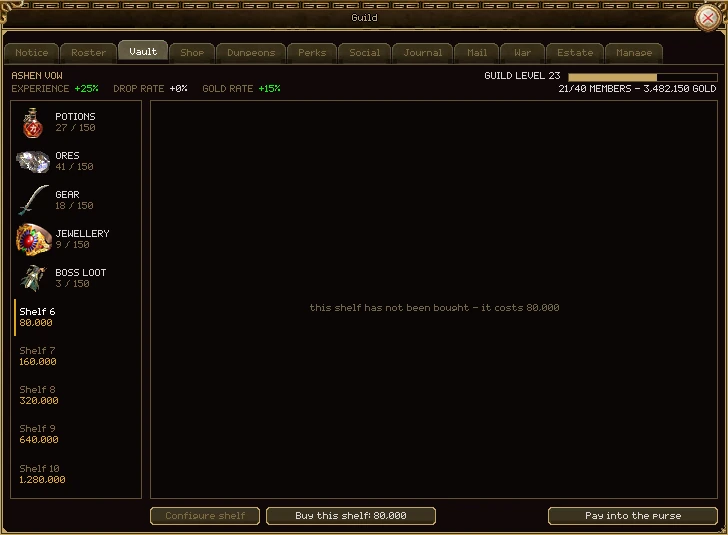
The first shelf comes with the guild. The rest are bought in order, out of the guild's purse, by a rank that may buy vault shelves. Each costs twice the one before:
| Shelf | 2 | 3 | 4 | 5 | 6 | 7 | 8 | 9 | 10 |
|---|---|---|---|---|---|---|---|---|---|
| Gold | 5,000 | 10,000 | 20,000 | 40,000 | 80,000 | 160,000 | 320,000 | 640,000 | 1,280,000 |
All ten together cost 2,555,000 gold and hold 1,500 items.
The guild's own gold, shown in the header of every tab. Any member may pay in. Nothing comes back out as cash: the purse is only ever spent on things the guild buys, and every coin is written in the journal.
What pays in
- Members paying in, from the Vault tab (the roster's Given column counts it).
- The gold dropped on a guild dungeon run.
- Tax from land the guild holds.
- A letter's gold, when the guild's post is emptied.
- Selling an island to another guild, a bid returned, or half a building's price when it's taken down.
What it pays for
- Vault shelves.
- Wiping the perk tree.
- Mending at a smith, for a rank that may mend on guild funds.
- The guild shop.
- Declaring a war over land, and repairing castle gates.
- Renting the guild hall, buildings, and islands.
The purse holds at most 100,000,000,000 gold. A payment bigger than the room left is cut to fit.
Supplies the guild buys for its members. The purse pays; the items go into your own bag.
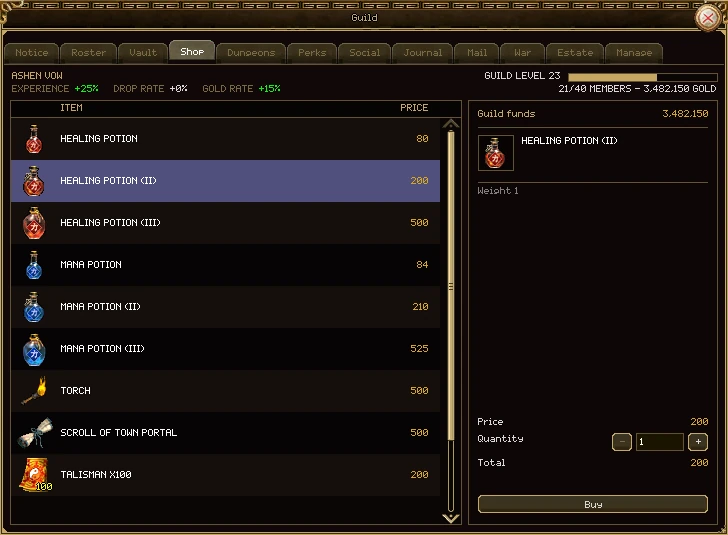
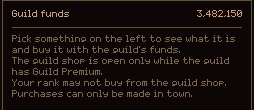
| Part | What it does |
|---|---|
| The list | What the shop sells and the price of each, from the guild's purse. |
| Guild funds | What's in the purse now. |
| Price, Quantity, Total | Set how many with the box or the minus and plus. Up to 100 of one item in a single purchase. |
| Buy | Press once and it reads "Sure?"; press again within three seconds to buy. Off, with the reason in red above it, if you can't. |
What's on the shelf
| Item | You get | Gold from the purse |
|---|---|---|
| Healing Potion, (II), (III) | 1 | 80, 200, 500 |
| Mana Potion, (II), (III) | 1 | 84, 210, 525 |
| Torch | 1 | 500 |
| Scroll of Town Portal | 1 | 500 |
| Talisman | 100 | 200 |
| Green Poison | 100 | 200 |
| Red Poison | 100 | 200 |
The rules
- The shop is open only while the guild has Guild Premium.
- Your rank needs the Buy from the guild shop permission. Officers have it in a new guild; members don't.
- You have to be in a town, and everything you buy has to fit in your bag.
- Every purchase is written in the journal: who, what and how many.
- The items are the guild's own copies. They work exactly like the ordinary ones and can be traded, but no NPC shop will buy them, so the guild's gold can't be turned into a member's.
- Prices are the same as an NPC shop's. The guild pays them so you don't have to.
The dungeons your guild has open this period, how much of each is left, and who leads the hunt and shares out the loot.
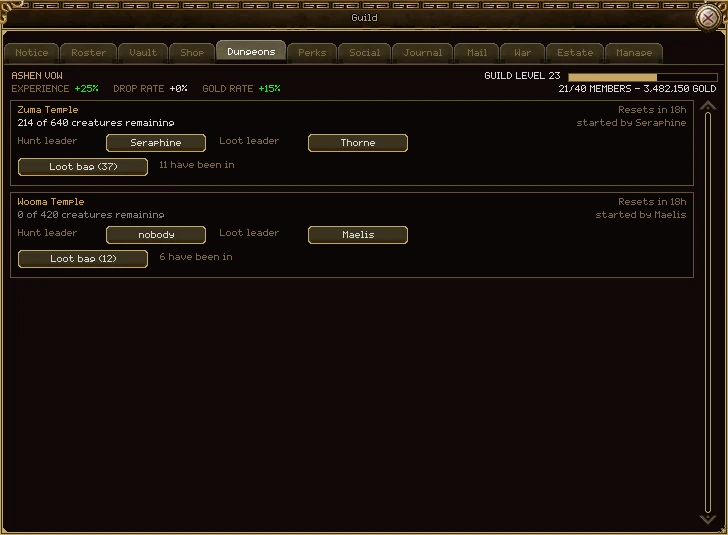
| Part | What it does |
|---|---|
| Name and reset | The dungeon, and how long until it resets. |
| Remaining | How many creatures are still alive in the guild's copy. |
| Hunt leader | Who may take the guild in. "nobody" means any member may. |
| Loot leader | Who hands out the loot bag. "nobody" means any rank that may hand out dungeon loot. |
| Loot bag | Opens the run's shared loot bag; the number is how many items are in it. |
| have been in | How many members have entered the run. |
A rank that may open dungeons starts a run at the dungeon's Instance Stone, and can pick the two leaders here from the roster. Everything else about runs, the loot bag and resets is in Dungeons.
The guild levels up as its members hunt. Every level is one perk point, and points go on a tree of perks that every member carries as long as they're in the guild.
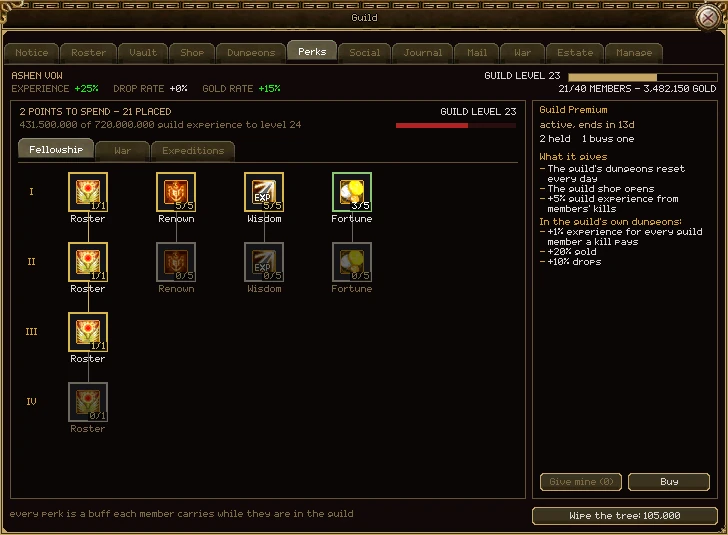
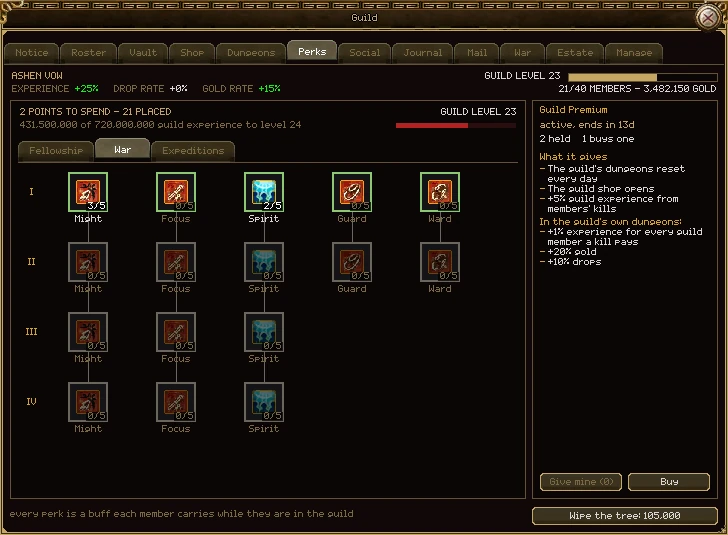
| Part | What it does |
|---|---|
| Points to spend, placed | Points the guild hasn't spent yet, and points already on the tree. |
| Guild level and bar | The guild's level and its guild experience towards the next. |
| Fellowship, War, Expeditions | The tree's three branches, one page each. |
| I to IV | The tiers. Each tier of a perk opens at a guild level, and only once the tier above it is full. |
| A perk | Its picture, with points held out of the most it can take in the corner. Gold edge: it holds points. Green edge: a point could go on it now. Grey and dimmed: something is in the way. Click a green one to place a point. |
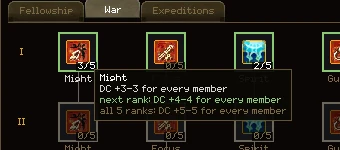
| Its tooltip | What it gives now, what the next point would give, what all its points give, and, if it's shut, why: the guild level it needs, or the perk before it not being full. |
| Guild Premium | The column on the right. See Guild Premium. |
| Wipe the tree | Takes every point back to be placed again. Costs 5,000 gold per point placed, from the purse. Press it, then press it again within three seconds. |
The rules
- Every point costs one perk point, at any tier. What gets harder is reaching the guild level.
- Placing points needs Spend perk points; wiping needs Wipe the perk tree. In a new guild only the leader has either.
- A wipe is refused if it would leave the guild with more members than places, since Roster points come back too.
- When the tree is changed by an update, the next wipe is free, and the button says so.
- Perks are a buff every member carries. Leave the guild and they're gone. The guild buff's icon on your buff bar lists what it's giving you.
- Might, Focus and Spirit give you at most one rank for every 4 of your own levels, and Guard and Ward one for every 8, so a level-20 member gets 5 of a full Might's 20 ranks. The tooltip tells you when your level is holding you back.
Guilds no longer get a bonus for being small, there is no level cap at 60, and the tree is three branches of 132 points. What's on this page is how it works now.
The whole tree: 132 points in three branches. No guild fills it, so every point is a choice.
Fellowship: who you are (34 points)
| Perk | Points | Opens at guild level | Needs full | Each point | At most |
|---|---|---|---|---|---|
| Roster I | 1 | 2 | - | +10 places | 20 members |
| Roster II | 1 | 10 | Roster I | +10 places | 30 members |
| Roster III | 1 | 20 | Roster II | +10 places | 40 members |
| Roster IV | 1 | 30 | Roster III | +10 places | 50 members |
| Renown I | 5 | 1 | - | +5% guild experience | +25% |
| Renown II | 5 | 25 | Renown I | +5% guild experience | +50% |
| Wisdom I | 5 | 3 | - | +5% experience for every member | +25% |
| Wisdom II | 5 | 30 | Wisdom I | +5% experience for every member | +50% |
| Fortune I | 5 | 3 | - | +5% gold for every member | +25% |
| Fortune II | 5 | 30 | Fortune I | +5% gold for every member | +50% |
A guild starts with 10 places, and 50 is the most any guild can hold. Renown does nothing for members today; it makes every later point arrive sooner.
War: what you hit (80 points)
| Perk | Tiers open at guild level | Points | Each point | At most |
|---|---|---|---|---|
| Might | I 1, II 15, III 30, IV 50 | 4 tiers of 5 | DC +1-1 | DC +20-20 |
| Focus | I 1, II 15, III 30, IV 50 | 4 tiers of 5 | MC +1-1 | MC +20-20 |
| Spirit | I 1, II 15, III 30, IV 50 | 4 tiers of 5 | SC +1-1 | SC +20-20 |
| Guard | I 5, II 35 | 2 tiers of 5 | AC +1-1 | AC +10-10 |
| Ward | I 5, II 35 | 2 tiers of 5 | MR +1-1 | MR +10-10 |
Each tier needs the one above it full. Warriors and assassins use DC, wizards MC and taoists SC, so a guild of mixed classes has to choose. Your own level caps what you get:
| Your level | 10 | 20 | 40 | 60 | 80 |
|---|---|---|---|---|---|
| From a full Might, Focus or Spirit | +2-2 | +5-5 | +10-10 | +15-15 | +20-20 |
| From a full Guard or Ward | +1-1 | +2-2 | +5-5 | +7-7 | +10-10 |
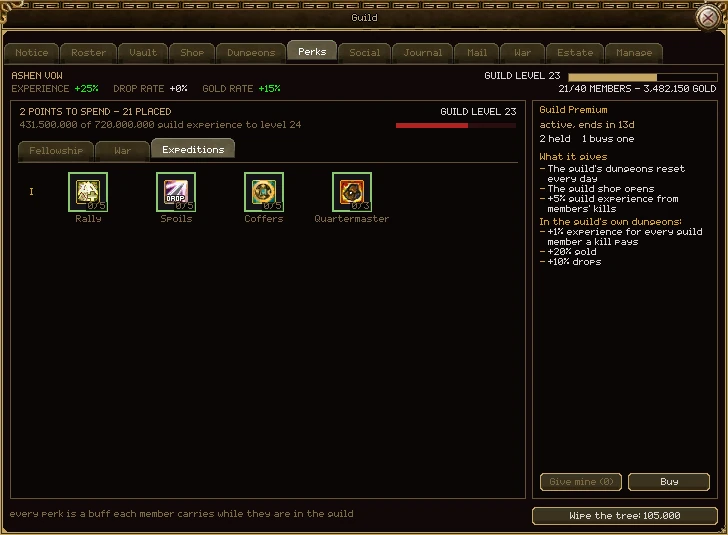
Expeditions: the guild's own dungeon (18 points)
| Perk | Points | Opens at guild level | Each point | At most |
|---|---|---|---|---|
| Rally | 5 | 10 | +1% experience for each guildmate on the same floor, up to 10 counted | +50% with 10 there |
| Spoils | 5 | 15 | +10% drops | +50% |
| Coffers | 5 | 15 | +10% more of a run's gold into the purse | +50% |
| Quartermaster | 3 | 20 | +100 places in a run's loot bag | 800 places |
These work only inside your own guild's copy of a dungeon, not in your own or your group's copy and not out in the world. Rally counts you too, and adds to Wisdom: a guild with both full gets +100% experience in its own dungeon.
A guild earns experience when its members kill monsters. It's extra: the member keeps every point of their own.
- The guild gets 5% of the experience each member earns from kills, after the member's own rates and the group's share. Quests and experience items pay the guild nothing.
- Renown adds to that, and so does Guild Premium (+5%).
- Small guilds earn faster. Under 20 members, guild experience is multiplied: about ×2 for 5 members and ×1.4 for 10. Recruiting never lowers the guild's income overall.
- Every level is one perk point. There is no top level.
- Every member online is told when the guild levels up, and members who may spend points are reminded while points are waiting.
| Guild level | That level costs | Total from a new guild |
|---|---|---|
| 1 | 1,250,000 | 1,250,000 |
| 5 | 31,250,000 | 68,750,000 |
| 10 | 125,000,000 | 481,250,000 |
| 20 | 500,000,000 | 3,587,500,000 |
| 30 | 1,125,000,000 | 11,818,750,000 |
| 40 | 2,000,000,000 | 27,675,000,000 |
| 50 | 3,125,000,000 | 53,656,250,000 |
| 60 | 6,746,640,616 | 102,548,398,320 |
Up to level 50 each level costs 1,250,000 × the level squared. After 50, each level costs 8% more than the one before, so there's always a next level, just a dearer one.
Every coin into and out of the purse, every vault move and every big decision, with who did it and when. Any member may read it.
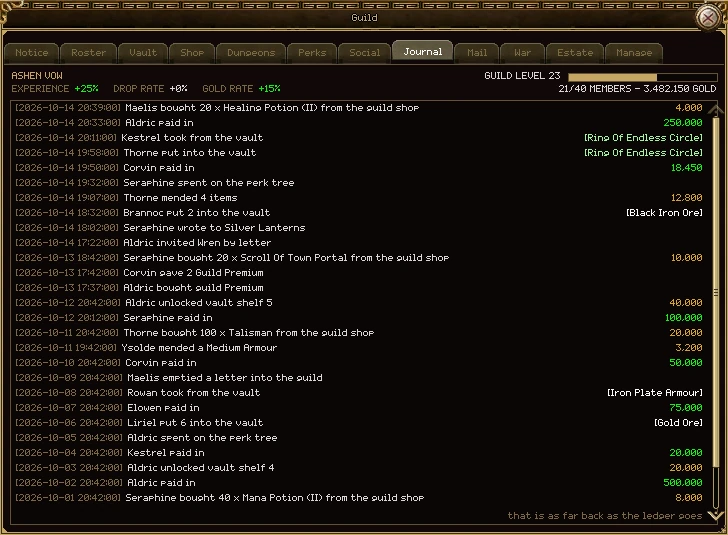
- Newest at the top. Scroll down, or use the wheel, for older rows; they load as you go.
- On the right: the gold moved, green coming in and gold going out. A vault row shows the item instead; hover it for the item's full tooltip, refines and all.
- Hover a row that's cut short to read all of it.
- It goes back 30 days.
It records deposits, repairs paid by the guild, shop purchases, vault shelves bought, items in and out of the vault, perk points and wipes, dungeons opened and their loot handed out, letters written and emptied, invitations sent by letter, Guild Premium given and bought, wars declared, won and lost, land tax, the hall's rent, buildings, and islands bought, sold and renamed.
The guild's own mailbox, and letters written in the guild's name. What a letter carries goes into the vault, never into anyone's bag.
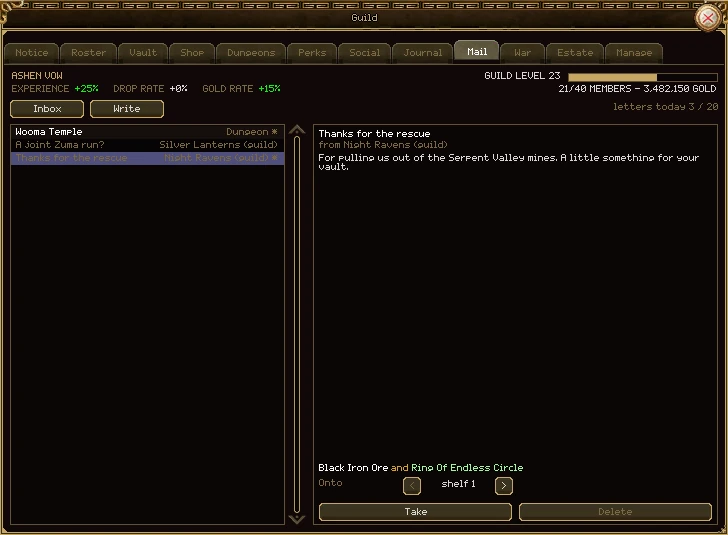
| Part | What it does |
|---|---|
| Inbox, Write | The two halves of the tab. |
| letters today | How many letters the guild has written today, out of 20 a day. |
| The letter list | Subject on the left, sender on the right. Unread letters are bright. |
| The letter | Its subject, who sent it, and what it says. At the foot, what it carries. |
| Onto shelf | Which vault shelf its items will go on. Use the arrows to choose. |
| Take | Empties the letter: its items onto the shelf you chose, any gold into the purse. You have to be in a town, on a shelf your rank may put things on, with room for all of it. |
| Delete | Throws the letter away. Only once it's empty. |
Letters to the guild come from other guilds, and from the game: when a guild dungeon resets, whatever is left in its loot bag arrives here, from "Dungeon". The guild's mailbox holds 100 letters from others; the game's own letters always arrive.
Writing as the guild
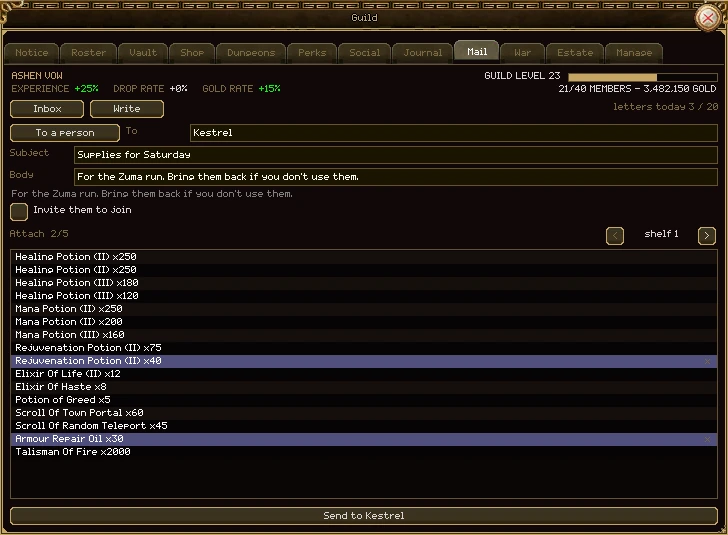
- Press Write. Choose To a person or To a guild with the button, and type the name.
- Fill in the subject (up to 60 characters) and the message (up to 500).
- To a person who isn't in a guild, tick Invite them to join to put an invitation in the letter. It needs a rank that may invite.
- Pick a shelf with the arrows and click up to 5 items to attach them (click again to take one off). Only from shelves your rank may take from.
- Press Send to and the name.
- A guild's letter carries items from the vault but never gold.
- Reading the post needs Read the guild's post; writing needs Write as the guild. Officers have both in a new guild.
- Every letter written, and every letter emptied, goes in the journal.
A guild names its own ranks, puts them in order and decides what each may do. Up to 10 ranks; the first is always the leader.
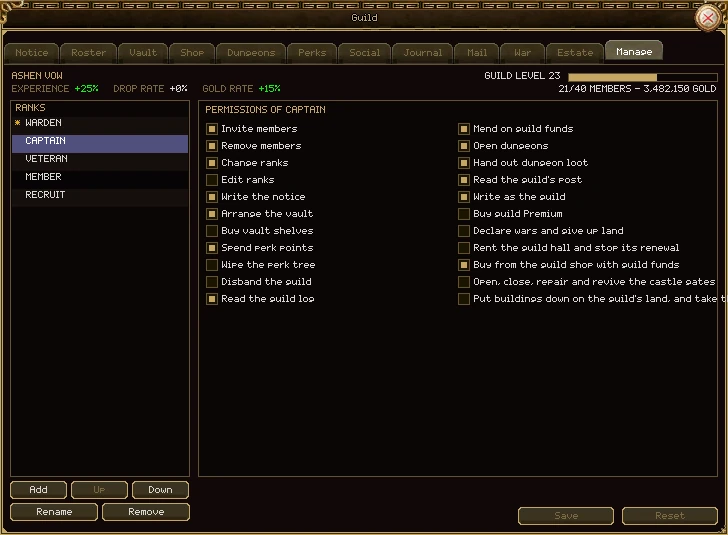
| Part | What it does |
|---|---|
| Ranks | Highest first. Click one to see and change its permissions. The star marks the leader. |
| Add | A new rank at the bottom, with no permissions. |
| Up, Down | Move the picked rank. Nothing can go above the leader. |
| Rename | Type a new name (up to 24 characters) and press Enter. |
| Remove | Takes the rank away. A guild keeps at least two ranks, and the leader's can't go. |
| Members of a removed rank go to | Appears when you remove a rank: click to choose which rank its members move to. |
| The tick boxes | What the picked rank may do. The leader's are all ticked and can't be changed: the leader may always do everything, including permissions added in future. |
| Save, Reset | Save sends the whole list to the guild at once. Reset throws your changes away. |
Only a rank that may edit ranks sees this tab; in a new guild that's the leader alone. Giving a member a rank is done on the Roster.
Each rank holds any of these. A new guild starts with Leader, Officer and Member, set as shown.
| Permission | What it allows | Officer | Member |
|---|---|---|---|
| Invite members | Invite players to join, face to face, by name or in a letter. | Yes | - |
| Remove members | Remove members of a lower rank. | Yes | - |
| Change ranks | Move members of a lower rank to another rank below your own. | Yes | - |
| Edit ranks | Use the Manage tab: add, rename, reorder and remove ranks and set their permissions. | - | - |
| Write the notice | Write, edit and remove notice pages. | Yes | - |
| Arrange the vault | Name shelves, choose their pictures, and set who may use them. | Yes | - |
| Buy vault shelves | Unlock the next shelf with the purse. | - | - |
| Spend perk points | Place points on the perk tree. | - | - |
| Wipe the perk tree | Take every point back, for a fee from the purse. | - | - |
| Disband the guild | Reserved for ending the guild; there is no Disband button in the window yet. | - | - |
| Read the guild log | Read the Social tab. | Yes | Yes |
| Mend on guild funds | Pay a smith with the purse. | Yes | - |
| Open dungeons | Start a guild dungeon run and choose its hunt and loot leaders. | Yes | - |
| Hand out dungeon loot | Share out a run's loot bag when the run has no loot leader. | - | - |
| Read the guild's post | Read the guild's mail and empty letters into the vault. | Yes | - |
| Write as the guild | Write letters in the guild's name, with items from the vault. | Yes | - |
| Buy guild Premium | Spend the guild's Guild Premium items on Premium. | - | - |
| Declare wars and give up land | Declare a war over land with the purse, and abandon land the guild holds. | - | - |
| Rent the guild hall and stop its renewal | Rent the hall with the purse, and stop or restart its weekly rent. | - | - |
| Buy from the guild shop with guild funds | Use the Shop tab. | Yes | - |
| Open, close, repair and revive the castle gates | Work the gates of land the guild holds; repairs come from the purse. | - | - |
| Put buildings down on the guild's land, and take them away | Use Build on the guild's land or island. | - | - |
The leader holds every permission. Whatever a rank holds, nobody may act on someone of their own rank or above.
Two tabs about what the guild owns and fights for. Each has its own chapter.
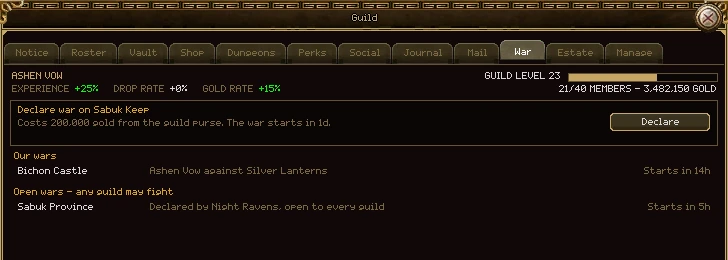
- War: declare war over land while standing on it, and follow every war your guild is in. See Wars and conquest.
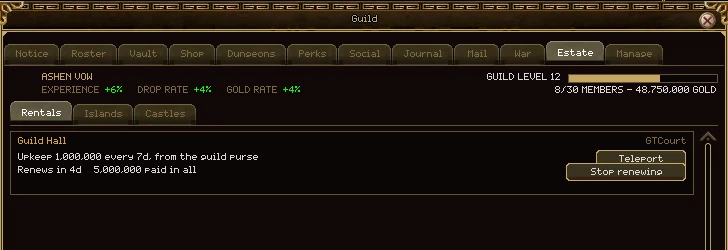
- Estate: three sections. Rentals is the rented guild hall, Islands the guild's islands as cards, and Castles the land it holds, one at a time from a list, with their gates and taxes. See the Estate tab, the rented hall and Islands.
Members of your guild show on the minimap and the big map wherever they are on the same map as you, however far away.
- They're a marker, not a player you can click: hover one on the big map to see the name.
- Only on the same map, and the same copy of it: a guildmate in a dungeon copy doesn't show in the public one.
- Members of your group show the same way. See Maps and travel.
Everything said in guild chat, kept. Log in after a day away and read what you missed.