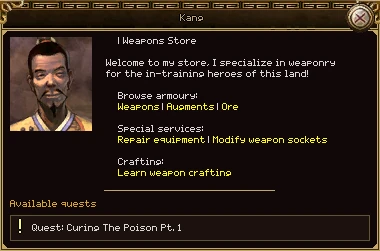
Click a person in town to talk to them. You need to be within 5 cells of them. The conversation opens at the top left of the screen, with their name across the top and their portrait beside what they say.
| Part | What it does |
|---|---|
| Name | Who you are talking to. |
| Portrait | Their face, when they have one. A notice board or a stone has none. |
| What they say | The page of the conversation you are on. A long page gets a scroll bar on the right. |
| Yellow words | Your choices. They sit inside the sentence rather than in a row of buttons underneath. They turn red under the pointer; click one to take that choice. Most lead to another page; some, like Exit or Leave, end the conversation. |
| The box underneath | Whatever the page opens: a shop, a smith's counter, a socket bench, or the list of quests this person has for you. Only one at a time. |
| Close button | Ends the conversation and takes every box under it away. |
The rules
- Walking more than 5 cells away, changing map or teleporting ends the conversation.
- Clicking another NPC starts a new conversation in place of the old one.
- Buying, selling, repairs and quests all need you to stay within the same 5 cells.
- Most shopkeepers will not serve a murderer. With 200 or more PK points they tell you to leave.
- You can drag the conversation anywhere; every box under it moves with it.
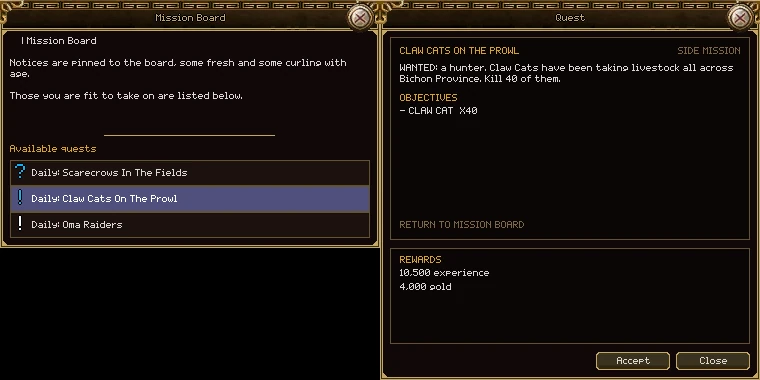
When somebody has work for you, an Available quests list appears under the conversation on any page that is not a shop or a counter. Click a row to read the quest in a window beside the conversation.
The list
| Part | What it does |
|---|---|
| The mark | ! in colour: yours to take. ? in colour: finished, hand it in here. A white !: you have it and have not finished it yet. The colour is the quest's kind (see the marks). |
| The row | The kind and the name, such as Daily: Oma Raiders or Quest: Wolves In Bichon. Hover for a summary; click to open it. Up to six rows show. |
The Quest window
| Part | What it does |
|---|---|
| Name and badge | The quest's name, and on the right what kind it is: QUEST, SIDE MISSION, DAILY, MAIN STORY and so on. |
| Text | What the person says: their offer for a new quest, a reminder for one under way, their thanks for one you are handing in. |
| Objectives | What to do and how many. |
| Return to | Who takes it back when it is done. |
| Rewards | What it pays. If a quest offers a choice of rewards, click the one you want before you press Complete. |
| Accept | Takes the quest. It goes into your log and onto your tracker. |
| Complete | Hands it in and pays you. Items you were asked to collect are taken from your bag. |
| come back when it is done | Shown in place of a button for a quest you have not finished. |
| Close | Puts the quest down. The conversation and the list stay open. |
Only quests you can take right now are offered: your level is in range, you have done what comes before it, and a daily has not already been done today. A quest that is not on the list is not available to you yet.
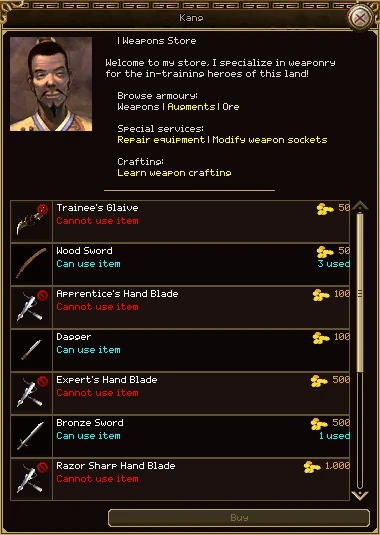
Pick a shop page in a conversation (Mr. Kang's Weapons, for example) and the goods list opens under it. Your bag opens beside it too, so you can sell.
| Part | What it does |
|---|---|
| Picture | Hover it for the full tooltip, as in your bag. A red mark in the corner means your class or level cannot use it. |
| Name and price | The price is in gold, in red when you cannot afford it. |
| Second line, left | Can use item (blue) or Cannot use item (red) for equipment, Purity for ore. |
| Second line, right | 3 used: second-hand ones players have sold here. 12 left: how many of something stackable the shop holds. Unlimited: the shop makes them, buy as many as you like. |
| − / + and Buy | For things that stack (potions, scrolls): click the row, choose how many, press Buy for …. One purchase is at most one full stack. |
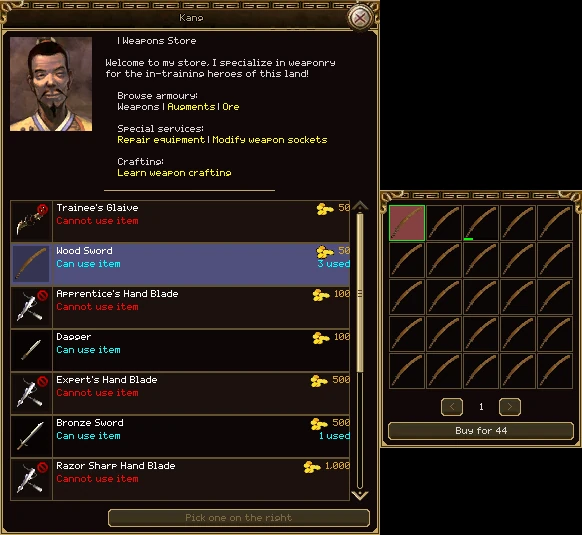
| The grid | For equipment and ore, where no two are alike. Second-hand ones come first, then new ones. Click a cell, then Buy for … under the grid. The arrows turn the page when there are more than 25. |
| Colour swatch | A small square in the corner of a new item's cell: the colour that item comes out in. You get the one you click. |
Buying a potion
- Click the row. Its edge turns gold.
- Press + until you have the number you want.
- Press Buy for …. The button shows the total.
Buying a sword
- Click the sword's row. The grid opens on the right, and the shop's own button says Pick one on the right.
- Hover the cells. A second-hand one shows its wear, its price and who sold it.
- Click the one you want, then Buy for … under the grid.
What you sell to a shop does not vanish. If it is different from a new one, the shop puts it on its shelf and anybody can buy it.
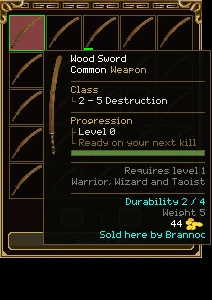
- One shelf per counter, shared by everyone. Newest first. It survives the server restarting.
- Equipment is kept only when it differs from a new one: worn, repaired, refined, dyed, or carrying extra stats. A brand-new sword you sell is simply bought; there is nothing to shelve.
- Things that stack are pooled into one count (“12 left”) when the shop does not make them itself. If it does, the row stays Unlimited.
- The price is what that particular item is worth, at the shop's own rate. A sword worn to nothing costs about three quarters of a new one; extra stats make it dearer.
- A shelf holds 200 items. When it is full, the oldest goes. Nothing decays while it waits.
Something you sold by mistake is on the shelf for anyone. Go back and buy it before somebody else does, and expect to pay the shop's price for it, not what you were paid.
With a shop open, your bag changes: a click picks an item to sell instead of picking it up. Nothing is sold until you press the button.
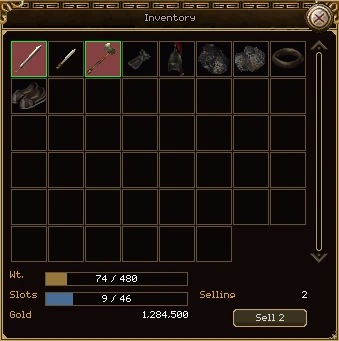
- Open a shop page. The bag opens with it if it was shut.
- Click each item to sell. It gets a green border; click again to unpick it. Items this shop does not buy are dimmed, and clicking one tells you so.
- Press Sell (or Sell 3, and so on). Everything picked goes at once, whole stacks included.
What a shop pays
- Half of what the item is worth. A new item is worth its list price; worn down to nothing it is worth three quarters of that, and every repair takes a little more off.
- Extra stats add 10% to the value for each point.
- Each shop buys only certain kinds. A weapon smith buys weapons, a jeweller rings and necklaces, an ore page only ore. Try another counter in the same town.
- You cannot sell what you are wearing or anything locked.
The bag counts what you have picked, not the gold you will get: the shop decides the price of each item when it buys it. Watch your gold line.
Besides shops, a page of a conversation can open a counter: a box under the conversation where that person does a job for you. You cannot open these with a key; you go to the person.
| Counter | What it is for | Who has one |
|---|---|---|
| Shop | Buying, and selling from your bag. Above. | Every town's weapon, armour, jewellery, potion and book sellers. |
| Repair | Mending what is worn. Repairing. | About sixty smiths and shopkeepers, such as Mr. Kang, Linda and Amy in Bichon Town. |
| Socket bench | Setting gems in holes. Sockets. | Weapon, armour and jewellery shops: Mr. Kang (weapons), Linda (armour), Amy (jewellery). |
| Refine and collect | Improving a weapon, and fetching it back. Refining. | Piersym in Bichon Castle, Maddox in Sabuk Keep, Jack in Desert Mud Fortress, Borg in Bichon Province. |
| Accessory bench | Levelling a rare ring. Accessories. | Fido in Bichon Castle. |
| Teaching | Buying recipes. Learning a recipe. | Amy in Bichon Town, the jewellers in Shandam, Ronnie in Bichon Province. |
| Companions | Adopting and keeping companions. Companions. | The Companion Managers in the towns. |
| Teleports | Travel. Maps and travel. | The teleporters in the towns. |
| Instance stone | Entering a dungeon. Dungeons. | Stones at dungeon entrances. |
Some people mention services that are not open yet: master refining, refinement stones, item fragments and weapon crafting are only words on their pages for now.
Press J. Every quest you hold, grouped by where it comes from, with the details of the one you pick.
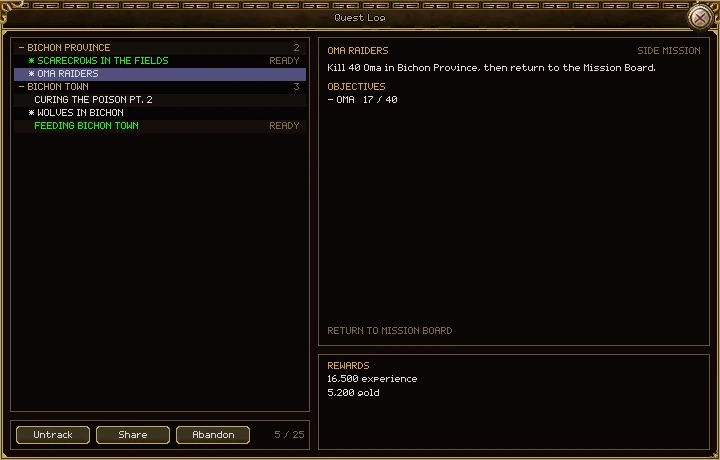
| Part | What it does |
|---|---|
| Headings | The map the quest giver stands on, with how many quests you hold there. Click a heading to fold it away; it stays folded next time. |
| Quest rows | Click one to show it on the right. A star (*) means it is on your tracker. A green row with READY is finished: take it back. |
| Details | The name, its kind, what the giver said, the objectives with your progress, and who to return to. |
| Rewards | What it pays. |
| Track / Untrack | Puts the quest on the tracker, or takes it off. |
| Share | Offers the quest to your group. Greyed when you are not in a group. |
| Abandon | Gives the quest up. Your progress is lost, and the giver offers it again. |
| 5 / 25 | How many quests you hold, out of the most you may. It turns orange when full. |
The rules
- You can hold 25 quests. People still offer quests when your log is full, but accepting one is refused until you finish or abandon something.
- Drag the window's edges to make it bigger.
- A kill only counts if you are the one credited with it. A quest that says in a place counts only kills on that map.
- You can abandon a quest anywhere.
The quests you are working on, written over the world at the top left of the screen. L shows or hides it.
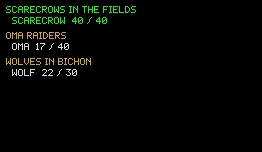
- Each quest's name in gold, and its objectives under it with your count. Both turn green when done.
- A quest you have just taken tracks itself. Untrack it in the log and it stays off.
- What you track is saved with your character, so it is the same on any computer.
- It has no frame: it is words with an outline, so it stays readable over any ground.
In a group, pick a quest in your log and press Share. Everyone else in the group is asked whether they want it.
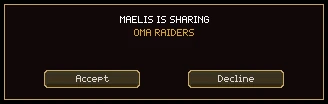
- It goes to the whole group, however far away they are.
- You have to hold the quest yourself. You can share again after 30 seconds.
- Accept takes the quest where you stand, from nothing: their progress does not come with it. You still need the level, the earlier quests and room in your log.
- Decline says nothing to the sharer.
- Only one offer is open at a time; a new one replaces the old.
Anybody with something for you wears a mark over their head, so you can see from across town who to talk to.
| Mark | Means |
|---|---|
| ! in colour | A quest you can take. |
| ? in colour | A quest you have finished: hand it in here. This wins over a !. |
| ? in grey | A quest you have taken from them and not finished. |
| Colour | Kind | How often |
|---|---|---|
| Yellow | An ordinary quest | Once. |
| Yellow | Repeatable | As often as you like. |
| Blue | Daily | Once a day. Comes back at midnight, UTC. |
| Blue | Weekly | Once a week. Comes back at midnight UTC as a new week starts (Monday). |
| Green | Main story | Once. |
| Purple | Account | Once. |
- A daily comes back when the date changes, not 24 hours after you did it.
- A mark does not change the moment a daily comes back; it catches up the next time you talk to somebody, change map or take or hand in a quest.
- An event quest can only be taken while its event is on. The log shows how long is left; you can still hand it in after the event ends.
- Today every quest pays experience, and dailies pay gold as well.
Five notice boards on the Shandam side hand out daily hunts. Click a board as you would a person; the dailies you can take are listed under it.
| Board | Where |
|---|---|
| Mission Board | Bichon Province, 453,382 |
| Mission Board | Border Village, 476,284 |
| Job Board | Ginko Valley, 254,198 |
| Mission Board | Taoist Village, 397,117 |
| Mission Board | Serpent Valley, 313,231 |
Every daily
| Board | Daily | Levels | Kill | Experience | Gold |
|---|---|---|---|---|---|
| Bichon Province | Scarecrows in the Fields | 7–17 | 40 Scarecrows in Bichon Province | 11,000 | 4,000 |
| Bichon Province | Claw Cats on the Prowl | 7–17 | 40 Claw Cats in Bichon Province | 10,500 | 4,000 |
| Bichon Province | Oma Raiders | 10–20 | 40 Oma in Bichon Province | 16,500 | 5,200 |
| Bichon Province | Ghosts in the Pass | 15–21 | 40 Devouring Ghosts, Corpse Raising Ghosts or Ghost Mages in the pass mines | 90,000 | 6,900 |
| Border Village | Wild Flocks | 5–14 | 30 Sheep in Border Village | 2,000 | 2,700 |
| Border Village | Restless Scarecrows | 7–17 | 30 Scarecrows in Border Village | 8,000 | 3,000 |
| Border Village | Yetis at the Border | 10–20 | 20 Forest Yetis in Border Village | 9,500 | 2,600 |
| Ginko Valley | Weeding the Valley | 7–17 | 30 Carnivorous Plants in Ginko Valley | 7,500 | 3,000 |
| Ginko Valley | Oma in the Valley | 10–20 | 30 Oma in Ginko Valley | 12,500 | 3,900 |
| Ginko Valley | Vermin in the Pass | 13–19 | 40 Cave Bats or Cave Maggots in the pass mines | 60,000 | 6,000 |
| Taoist Village | The Hungry Garden | 7–17 | 40 Carnivorous Plants in Taoist Village | 10,500 | 4,000 |
| Taoist Village | Cats in the Orchards | 7–17 | 50 Claw Cats in Taoist Village | 13,000 | 5,000 |
| Taoist Village | Oma Warriors | 10–20 | 40 Oma Warriors in Taoist Village | 23,000 | 5,200 |
| Taoist Village | Under the Temple | 13–19 | 50 Cave Bats or Cave Maggots under the temple | 75,000 | 7,500 |
| Serpent Valley | Yeti Cull | 10–20 | 50 Forest Yetis in Serpent Valley | 24,000 | 6,500 |
| Serpent Valley | Snakes in the Grass | 12–22 | 40 snakes in Serpent Valley | 47,000 | 6,400 |
| Serpent Valley | Ghosts of the Mines | 15–21 | 50 ghosts in the Serpent Valley mines | 115,000 | 8,700 |
| Serpent Valley | The North Mine | 16–22 | 30 ghosts in the Serpent Valley North Mine | 75,000 | 5,400 |
- The board only lists dailies your level is inside. Outgrow one and it stops being offered.
- Each can be done once a day. There is no other daily limit: take every one you qualify for.
- Only kills on the named map count. Killing scarecrows in Border Village does nothing for the Bichon Province board.
- Hand in at the board you took it from.
Storage is not an NPC here. Press S anywhere to look in it; putting things in and taking them out works only in a town's safe zone.
It is shared by every character on your account, holds 100 items to start with, and costs nothing. See Items and the bag for the window itself.